Loading
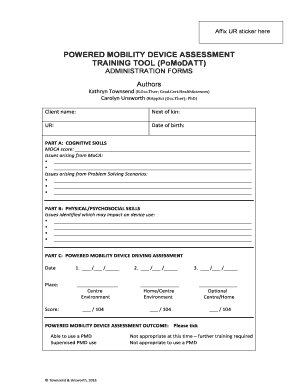
Get Affix Ur Sticker Here
How it works
-

Open form follow the instructions
-

Easily sign the form with your finger
-

Send filled & signed form or save
How to fill out the Affix UR Sticker Here online
Filling out the Affix UR Sticker Here form is an essential process for conducting assessments related to powered mobility devices. This guide provides a step-by-step approach to ensure you complete the form accurately and efficiently online.
Follow the steps to fill out the Affix UR Sticker Here online.
- Click the ‘Get Form’ button to access the Affix UR Sticker Here form. This will allow you to open the document in your online editor.
- Begin by entering the client name in the designated field. Ensure that the name matches the identification documents to prevent confusion.
- In the UR section, input the unique referral number associated with the assessment.
- Fill in the next of kin section, providing relevant contact information for emergency situations.
- Enter the date of birth in the specified format, ensuring it's accurate for identification purposes.
- Complete Part A by recording the MoCA score. This is crucial for assessing cognitive skills.
- List any issues arising from the MoCA evaluation in the provided space, citing specific concerns or noteworthy observations.
- In Part B, detail any physical or psychosocial skills issues that may impact device use, ensuring you address all relevant areas.
- Proceed to Part C, where you must complete the powered mobility device driving assessment by entering the date and associated scores from evaluations.
- Summarize the outcomes of the powered mobility device assessment by ticking the appropriate options, indicating the user's ability or need for further training.
- Review all filled sections to ensure all necessary information is included and accurate.
- Once completed, you can save your changes, download, print, or share the form as needed.
Complete your documents online for quicker processing and enhanced efficiency.