Loading
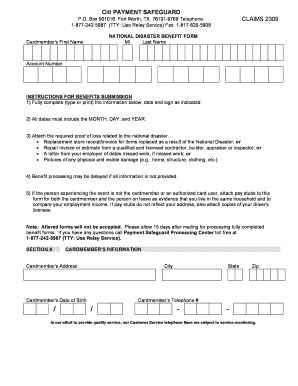
Get National Disaster Benefit Form
How it works
-

Open form follow the instructions
-

Easily sign the form with your finger
-

Send filled & signed form or save
How to fill out the NATIONAL DISASTER BENEFIT FORM online
Filling out the National Disaster Benefit Form online is a crucial step in accessing support following a national disaster. This guide provides clear, step-by-step instructions to help you navigate the form with ease.
Follow the steps to effectively complete the form online:
- Press the ‘Get Form’ button to access the form and open it in your preferred editor.
- Begin by filling out Section A, which includes cardmember's information. Provide your last name, first name, account number, address, date of birth, and telephone number. Make sure to include any necessary area codes.
- Move to Section B, where you will enter details about the person experiencing the national disaster. Include their name, address, city, state, zip code, relationship to the cardmember, date of the disaster, and a brief description of the incident. Indicate whether it was declared a national disaster by the U.S. government.
- Complete the section detailing the description of loss and any missed work. Provide the dates of absence, the employer's name, return date, and employer's telephone number and address.
- Review the certification statement carefully and ensure you understand the consequences of providing false information. Sign and date the form as required.
- Once all sections are filled out, finalize your document by saving changes. You may choose to download, print, or share the form as needed.
Complete the National Disaster Benefit Form online today to ensure you receive the support you need.
The first step for individuals and businesses needing assistance should be through the toll-free tele-registration hotline, available through the Federal Emergency Management Agency at 1-800-621-FEMA (3362) (TTY: 1-800-462-7585).