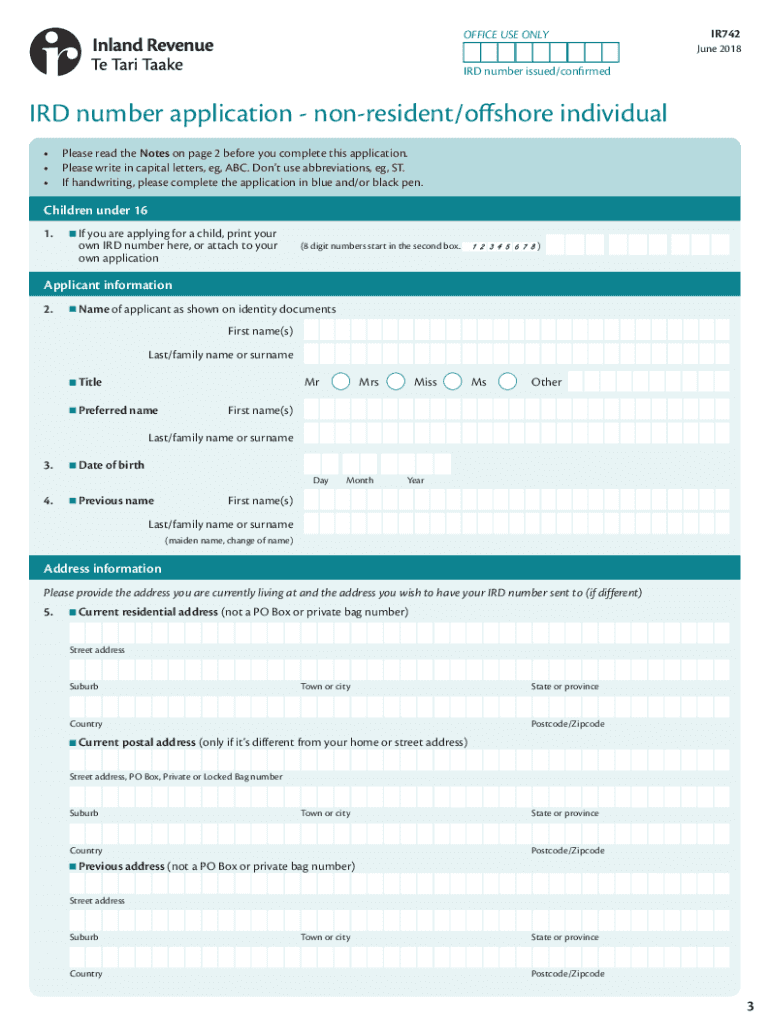
Rson. An offshore person is someone who: • is a New Zealand citizen who has been overseas for the last three or more years continuously (and is not currently in New Zealand), or • doesn't have a New Zealand residence visa granted by Immigration New Zealand, or • has a New Zealand residence class visa and has been overseas for the last twelve months continuously (and is not currently in New Zealand). If these don't apply then use the IRD number application - resident individua.
Loading

Open form follow the instructions

Easily sign the form with your finger

Send filled & signed form or save
How to fill out the NZ IR742 online
Filling out the NZ IR742 form is a crucial step for non-resident or offshore individuals applying for an IRD number. This guide will provide clear instructions to help you navigate the online application process effectively.
Follow the steps to complete your NZ IR742 application smoothly.
- Press the ‘Get Form’ button to access the NZ IR742 form online. Make sure to select the correct version for non-resident or offshore individuals.
- Begin filling out the applicant information by providing your name as it appears on your identity documents in the designated fields.
- Enter your date of birth and any previous name you may have used, ensuring the details match your identity documentation.
- Complete your current residential address accurately. If you have a different postal address, fill that in as well.
- Provide your contact details, including mobile and daytime phone numbers. Indicate if you consent to receive your new IRD number via email or text message.
- Select the reason for applying for an IRD number from the available options, such as buying property or for employment purposes. Documentation may be required based on your selection.
- If you have a taxpayer identification number (TIN), enter it along with the corresponding country. If you do not have a TIN, provide a reason.
- Indicate whether you hold a fully functional New Zealand bank account or if customer due diligence has been completed. Follow the instructions provided to verify this.
- Complete the questions regarding temporary tax exemptions if applicable, followed by any information regarding your status as a non-resident contractor or seasonal worker.
- Read the declaration section carefully and sign electronically if completing the form online. Ensure all provided information is accurate and complete.
- After you have filled out all sections, save your changes. You can then download the form or print it for submission.
Start your application now and navigate the process of obtaining your NZ IRD number online.
Experience a faster way to fill out and sign forms on the web. Access the most extensive library of templates available.
Related content
by RFX Klein · 2016 — GC/MS and IR (742); analysis of 23 benzylpiperazine (BZP) and...
Journal of Research in Biology is an international scientific journal committed to the...
Get answers to your most pressing questions about US Legal Forms API.
What form do I need to fill out before entering New Zealand?
Before entering New Zealand, travelers must complete a passenger arrival card, which typically requires you to declare your intentions and provide information regarding your stay. This card is usually distributed during your flight. Ensure that you also gather relevant documentation for the NZ IR742 if your visit relates to tax matters.
How do I get my NZ IRD number from overseas?
If you are applying for your NZ IRD number from overseas, you can do so through the Inland Revenue's online application form. It's essential to prepare any supporting documents, such as proof of identity, as required. Consider using uslegalforms to streamline your application process for the NZ IR742, ensuring you meet all necessary requirements.
What is the format of a New Zealand IRD number?
The New Zealand IRD number format consists of 8 or 9 digits, which may be separated into three groups, usually in the format of '123-456-789'. This number serves as your primary tax identifier in New Zealand. Make sure to double-check your number for accuracy when filling out any official documents, especially those related to the NZ IR742.
What is a tax ID number in New Zealand?
A tax ID number in New Zealand is more commonly known as an IRD number. This unique identifier is issued by the Inland Revenue Department and is used for tax purposes, including income tax and GST. If you are engaged in business or receiving income in New Zealand, securing your NZ IR742 is crucial for compliance with tax laws.
Do I need an IRD number to open a bank account in NZ?
Yes, you typically need an IRD number to open a bank account in New Zealand. Banks require this number to meet regulatory requirements and to ensure proper tax reporting. Therefore, obtaining your NZ IR742 should be one of your first steps if you plan to establish a bank account in New Zealand.
How do I fill out a New Zealand address?
Filling out a New Zealand address involves including several key components, such as the recipient’s name, street address, suburb, city, and postcode. Remember to format the address clearly and provide all details to ensure accurate delivery. Properly formatting your address is important for applications, including those for the NZ IR742.
How do I get my New Zealand IRD number?
To obtain your New Zealand IRD number, you must complete an IRD number application, which is available online. You can submit your application through the official website or by mail, depending on your preference. If you are applying from overseas, you may require additional documentation, so it's wise to prepare accordingly, especially for the NZ IR742.
What is the format of a foreign tax identifying number?
A foreign tax identifying number typically follows a specific format, which may vary by country. For instance, it may include letters and digits, and often has a certain length. When applying for the NZ IR742, be sure to check the requirements for your specific situation to ensure you provide the correct number.
How to get a proof of address in New Zealand?
To acquire proof of address in New Zealand, you can gather documents like lease agreements, bank statements, or utility bills that include your name and address. If you find this process overwhelming, the NZ IR742 application can simplify it and provide you with the necessary forms for official verification.
What proof of address do I need to open a bank account in NZ?
To open a bank account in New Zealand, you typically need at least one document that proves your address. Accepted documents include utility bills, bank statements, or official letters from the government. Ensuring your name matches across these documents is crucial, and if you need more guidance, the NZ IR742 can be a helpful resource.
Use professional pre-built templates to fill in and sign documents online faster. Get access to thousands of forms.
If you believe that this page should be taken down, please follow our DMCA take down process here.