Loading
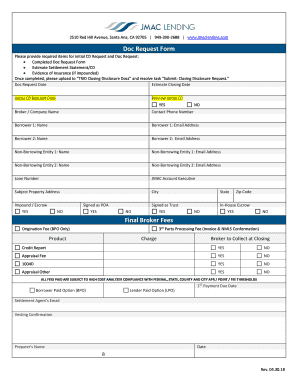
Get General Jmac Lending
How it works
-

Open form follow the instructions
-

Easily sign the form with your finger
-

Send filled & signed form or save
How to fill out the General JMAC Lending online
Filling out the General JMAC Lending form is a straightforward process that requires attention to detail and accurate information. This guide will help you navigate through each section of the form online, ensuring you provide all necessary information correctly.
Follow the steps to complete the General JMAC Lending form efficiently.
- Click ‘Get Form’ button to obtain the form and open it in the editor.
- Enter the 'Doc Request Date' to indicate when you are requesting the document.
- Fill in the 'Estimate Closing Date' to specify the anticipated date of your transaction.
- Provide the 'Initial CD Request Date' to indicate when you first request the Closing Disclosure.
- Select 'Preview Initial CD' by marking either YES or NO based on your preference.
- Complete the 'Broker / Company Name' and 'Contact Phone Number' fields to provide your contact details.
- Add the names and email addresses of all borrowers in the respective fields for 'Borrower 1' and 'Borrower 2'.
- If applicable, fill in the details for any non-borrowing entities, providing names and email addresses in the designated fields.
- Input the 'Loan Number' for reference in your request.
- Indicate the 'JMAC Account Executive' assigned to your case.
- Fill in the 'Subject Property Address', along with 'City', 'State', and 'Zip Code'.
- Confirm if the document is 'Signed as Trust' and 'Signed as POA' by selecting YES or NO.
- Indicate if 'In-House Escrow' is applicable by selecting YES or NO.
- Provide details about any fees such as 'Final Broker Fees', 'Origination Fee', and '3rd Party Processing Fee'.
- Determine whether a 'Credit Report' and 'Appraisal Fee' are needed by selecting YES or NO for each.
- Once you have filled out all required fields, review the form for accuracy.
- Save your changes, download the document if necessary, and upload it to 'TRID Closing Disclosure Docs'. Then resolve the task 'Submit: Closing Disclosure Request'.
Complete your documents online today for seamless processing.
If you still have questions or need further assistance, please contact us at (855) 738-0931, Monday – Friday, 8 am-5 pm PST. You can also reach us by email at servicing@jmaclending.com. We will respond to you within one business day.