Loading
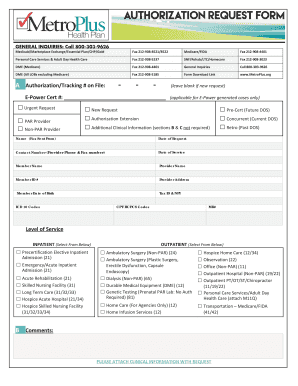
Get Metroplus Prior Authorization Form
How it works
-

Open form follow the instructions
-

Easily sign the form with your finger
-

Send filled & signed form or save
How to fill out the Metroplus Prior Authorization Form online
The Metroplus Prior Authorization Form is essential for users seeking approvals for various medical services. This guide provides clear, step-by-step instructions on how to efficiently complete the form online, ensuring all required fields are accurately filled out and submitted without hassle.
Follow the steps to successfully complete your authorization request.
- Press the ‘Get Form’ button to obtain the Metroplus Prior Authorization Form and open it in your browser.
- Indicate the type of request by selecting one of the options available, such as ‘Urgent Request’ or ‘New Request.’ Ensure to check the appropriate box.
- In the section titled ‘Authorization/Tracking # on File,’ leave the field blank if this is a new request.
- For E-Power generated cases, fill in the E-Power Cert # if applicable.
- Select the relevant service level by marking one of the options under ‘Inpatient’ or ‘Outpatient’ services, depending on the type of medical care being requested.
- Fill in all required fields, such as Name (Fax Sent From), Date of Request, Contact Number, Date of Service, Member Name, Provider Name, Member ID #, Provider Address, Member Date of Birth, Tax ID & NPI, ICD 10 Codes, CPT/HCPCS Codes, and MR#.
- Add any comments relevant to the request in section B, noting that clinical information must be attached with the request.
- Once all sections are completed, review the form for accuracy, then you can save your changes, download the document, print it for your records, or share it as needed.
Complete your Metroplus Prior Authorization Form online today for a seamless approval process.
Adhere to the instructions below to fill out Metroplus eft enrollment online quickly and easily: Log in to your account. ... Upload a document. ... Edit Metroplus eft enrollment. ... Get the Metroplus eft enrollment completed.