Loading
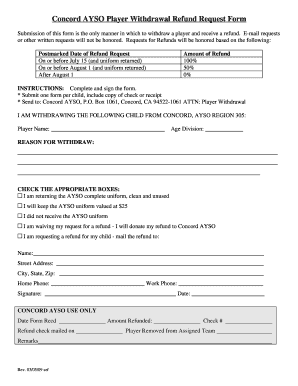
Get Concord Ayso Player Withdrawal Request Form - Amazon Aws
How it works
-

Open form follow the instructions
-

Easily sign the form with your finger
-

Send filled & signed form or save
How to fill out the Concord AYSO Player Withdrawal Request Form - Amazon AWS online
Filling out the Concord AYSO Player Withdrawal Request Form is an essential step for users wishing to withdraw their child from the program and request a refund. This guide provides detailed, step-by-step instructions to help you complete the form accurately and efficiently.
Follow the steps to complete your withdrawal request with ease.
- Click the ‘Get Form’ button to access the Concord AYSO Player Withdrawal Request Form and open it in the editor.
- Fill in the section labeled 'I am withdrawing the following child from Concord, AYSO Region 305' by entering the player's full name and age division.
- In the 'Reason for Withdraw' section, provide a detailed explanation for your child's withdrawal from the program.
- Select the appropriate options from the checkboxes regarding the uniform, ensuring clarity on whether you are returning it, keeping it, or did not receive it.
- If you are requesting a refund, complete the 'Mail the refund to' section with your full name, street address, city, state, and zip code. Ensure all contact details are accurate.
- Provide your home and work phone numbers, and ensure they are current.
- Sign the form and indicate the date of completion.
- After verifying all information is correct, save changes to the form. You can then download, print, or share the completed form as needed.
Complete your Concord AYSO Player Withdrawal Request Form online today!