Loading
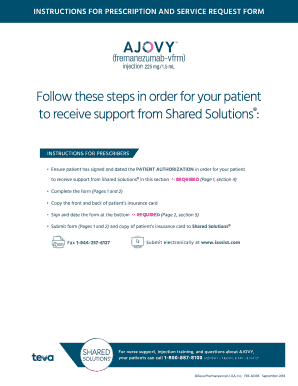
Get Prescription And Service Request Form - Teva Cares Foundation
How it works
-

Open form follow the instructions
-

Easily sign the form with your finger
-

Send filled & signed form or save
How to fill out the Prescription And Service Request Form - Teva Cares Foundation online
Filling out the Prescription And Service Request Form for the Teva Cares Foundation is an essential step to ensure that patients receive the support they need from Shared Solutions®. This guide will provide straightforward, step-by-step instructions to assist you in completing this form accurately and efficiently online.
Follow the steps to effectively complete the form.
- Click ‘Get Form’ button to obtain the form and open it in the online editor.
- Begin by entering the patient information in Section 1. Fill out the patient’s first name, middle initial, last name, date of birth, gender, and contact details such as home and mobile phone numbers, and email address. Ensure that this section is complete, as the form cannot be processed without it.
- In Section 2, specify the assistance requested from Shared Solutions®. Mark the appropriate options, such as injection training support or a sharps disposal container.
- Proceed to Section 3 to provide pharmacy information. Enter the name, address, and phone number of the preferred pharmacy for the patient.
- In Section 4, review and have your patient complete the Patient Authorization. Make sure they understand the implications of this authorization regarding sharing their health information and services related to their medical condition.
- Collect the patient’s signature and date in the designated areas of Section 4. It's important to note that the form cannot be processed without this section being completed.
- Next, move to Section 5 to fill in the prescriber information. Complete all required fields, including the prescriber's name, title, NPI number, office contact, and contact details.
- In the Patient Insurance Information section, provide relevant details regarding the patient's insurance coverage and attach a copy of their pharmacy benefits card as instructed.
- Fill out the prescription information required in Section 5. Include the medication details, dosages, and any necessary instructions. Ensure you indicate whether the prescription has been sent directly to the pharmacy.
- Finally, secure the prescriber's signature and date in this section. Remember, an ink signature is required and include all necessary prescriptions if mandated by state law.
- Once you have completed the form and verified all the information, you can save changes, download, and print the form to share it with Shared Solutions® via fax or electronically as mentioned in the instructions.
Complete your form online now to ensure timely processing for patient support.
Teva's commitment to patients provides certain Teva medications at no cost to patients in the United States who meet certain insurance and income criteria. Please click here to review the list of medications available through the Teva Cares Foundation Patient Assistance Program (PAP), or call 877-237-4881.
Industry-leading security and compliance
US Legal Forms protects your data by complying with industry-specific security standards.
-
In businnes since 199725+ years providing professional legal documents.
-
Accredited businessGuarantees that a business meets BBB accreditation standards in the US and Canada.
-
Secured by BraintreeValidated Level 1 PCI DSS compliant payment gateway that accepts most major credit and debit card brands from across the globe.