Get Request To Postpone Graduation - Cal State East Bay
How it works
-

Open form follow the instructions
-

Easily sign the form with your finger
-

Send filled & signed form or save
How to fill out the Request To Postpone Graduation - Cal State East Bay online
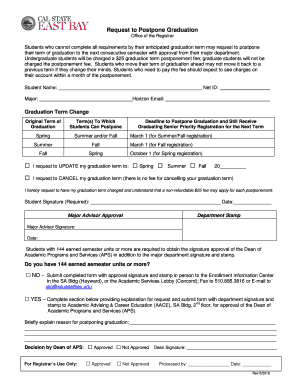
Completing the Request To Postpone Graduation form from Cal State East Bay is a straightforward process for students who need to adjust their graduation timeline. This guide provides a comprehensive overview of each section of the form, ensuring users can fill it out correctly and efficiently.
Follow the steps to successfully complete your graduation postponement request.
- Press the ‘Get Form’ button to acquire the Request To Postpone Graduation form and open it for editing.
- Enter your full name in the designated field labeled 'Student Name'. This identifies you as the requestor of the graduation postponement.
- Input your Net ID in the corresponding field. This unique identifier is crucial for your record.
- Specify your major in the 'Major' section to indicate the academic area of your study.
- Provide your Horizon email address to receive confirmation and updates regarding your request.
- Select your original term of graduation from the available dropdown options. This reflects the initial plan for your graduation.
- Indicate the term to which you wish to postpone your graduation by checking the appropriate box under 'I request to UPDATE my graduation term'. Options include Spring, Summer, or Fall.
- If you choose to cancel your graduation term rather than postpone it, check the respective box. No fee is associated with this option.
- Provide your signature and the date in the 'Student Signature' section to validate your request and signify your understanding of the fee that may apply.
- If applicable, have your Major Advisor sign and date the form in the 'Major Advisor Approval' section. A department stamp is also required.
- If you have 144 or more earned semester units, complete the appropriate section and seek the Dean of Academic Programs and Services' approval by obtaining their signature.
- If you do not have 144 earned semester units, submit the completed form in person, via fax, or through email as indicated in the respective sections.
- After completing all necessary fields and acquiring the required signatures, save changes to the document. You can then download, print, or share the form as necessary.
Start filling out your Request To Postpone Graduation form online today for a smooth graduation adjustment process.
Status of your application after it is complete. Admission decisions and interview questions....Campus Contacts. Admissions Websitewww.csus.edu/admissionsAdmissions Email Addressadmissions@csus.eduAdmissions Phone Number916-278-7766Refund Request Email Addressmavila@csus.eduRefund Request Phone Number916-278-775223 more columns • 10 Feb 2023