Loading
Form preview
  • US Legal Forms
  • Form Library
  • Foreign Forms
  • Foreign Canada Tax Forms
  • Canada T2 Short 2009

Get Canada T2 Short 2009

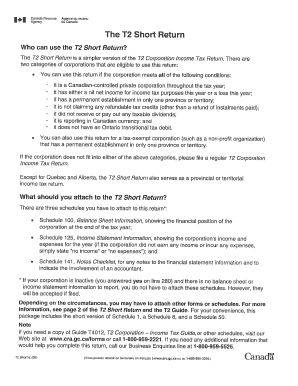
Dec 29, 2008 ... T2 SHORT RETURN. (2009 and later tax years). This form serves as a federal and provincial or territorial corporation income tax return, unless .

How it works

  1. Open form

    Open form follow the instructions

  2. Easily sign form

    Easily sign the form with your finger

  3. Share form

    Send filled & signed form or save

How to fill out the Canada T2 Short online

The Canada T2 Short is a vital document for corporate tax filing in Canada. This guide will help you navigate through the process of completing the form online with clear, step-by-step instructions.

Follow the steps to successfully complete the Canada T2 Short form.

  1. Click ‘Get Form’ button to obtain the form and open it in the editor.
  2. Begin by entering your corporation’s legal name and business number in the designated fields. Ensure that the information matches the records from Canada Revenue Agency.
  3. Complete the section for the fiscal period. Specify the start and end dates of your corporation's fiscal year, ensuring they are accurate.
  4. Fill in the income section. Report your total revenue and any deductions. Be careful to categorize your income accurately based on your business activities.
  5. Provide details related to taxes in the appropriate sections. This includes any applicable tax credits or payments that need to be claimed.
  6. Review the shareholder information section. List all shareholders, including their shares and contributions, ensuring accuracy to avoid discrepancies.
  7. Fill out the areas related to financial statements, if applicable. You may need to attach supporting documents to validate your financials.
  8. Finalize by reviewing all entered information carefully before submission. Ensure that all necessary fields have been completed and double-check for errors.
  9. Once all information is confirmed, save your changes. You can download, print, or share the completed form as needed.

Start completing your documents online today to ensure timely submission and compliance.

Get form

Experience a faster way to fill out and sign forms on the web. Access the most extensive library of templates available.

Related content

A pathology-MRI study of the short-T2 component in...
by GR Moore · 2000 · Cited by 231 — Evidence indicates that the short-T2 (10 to 50...
Learn more
A Primer on Canada's Large Value Transfer System
by N Arjani · 2006 · Cited by 64 — This paper provides a comprehensive overview of...
Learn more
Northern Green Canada Medical Cannabis Products
At Northern Green Canada, we put you and your health first. It's what drives us to deliver...
Learn more

Related links form

Kvb Rtgs Form Metropolitan Policy Surrender Obconline Npc Form

Questions & Answers

Get answers to your most pressing questions about US Legal Forms API.

Contact support

To report stock losses on your tax return in Canada, you must fill out Schedule 3 of the T1 return, detailing the loss incurred from the sale of stocks. It's crucial to keep thorough records of your transactions for accuracy. If you are uncertain, consulting with a tax professional can provide greater insight into this process.

To submit a nil return, complete the necessary tax form for your specific type of entity, such as T2 for corporations. Clearly indicate that there is no income to report and ensure you file it on time. Utilizing services like USLegalForms can offer clarity on the submission process, making it more manageable.

Filing a nil report involves submitting the appropriate forms that indicate there were no transactions or income within a specific period. Ensure you check the required forms for your specific situation and submit them by the deadline to remain tax compliant. Staying on top of these submissions helps avoid any potential issues.

Yes, you can file your Canadian tax return online using various tax software options approved by the Canada Revenue Agency. Many of these platforms ensure a user-friendly experience, allowing you to submit your return quickly and securely. Online filing can streamline the process and help you receive your refunds faster.

To file a nil return in Canada, you should complete the relevant tax return forms corresponding to your status, like the T1 for individuals or T2 for corporations. Clearly indicate that your income is nil or that there are no taxable transactions. Filing timely helps maintain compliance with tax authorities.

Filing a nil corporation tax return in Canada is straightforward. You must complete a T2 Corporation Income Tax Return form, indicating that there is no income to report. Be sure to submit it by the due date to avoid penalties, even if there is no tax payable.

To file NR4 on your Canadian tax return, you need to report payments made to non-residents for services or interest. You can do this using the T4A-NR slip, which details the payments. It's important to ensure that you have the proper documentation and that you comply with the Canada Revenue Agency regulations.

To make a T2, start by gathering all relevant financial information about your corporation, such as income, expenses, and previous tax documents. You then fill out the appropriate T2 form, ensuring all figures are accurate and comply with taxation laws. After completing the form, review it for errors and submit it to the Canada Revenue Agency by the due date. If you find this process overwhelming, consider using the Canada T2 Short form and the assistance of tools like US Legal Forms for support.

To file a T2 in Canada, corporations must complete the appropriate CCRA T2 form and submit it before the deadline, which is typically six months after the corporation's fiscal year-end. Businesses need to gather all necessary financial information, including income statements and balance sheets. It’s advisable to consult tax professionals or use platforms like US Legal Forms to simplify the filing process and ensure compliance with requirements. The Canada T2 Short form can streamline your filing experience.

The 90% rule for newcomers states that individuals who have recently moved to Canada must report their worldwide income if they have resided in the country for at least 183 days. This means they should recognize income earned in and outside of Canada. Understanding this rule is vital for newcomers to ensure proper tax reporting and compliance. Using resources like the Canada T2 Short can help individuals and businesses manage their tax obligations more effectively.

Get This Form Now!

Use professional pre-built templates to fill in and sign documents online faster. Get access to thousands of forms.
If you believe that this page should be taken down, please follow our DMCA take down processhere.

Industry-leading security and compliance

US Legal Forms protects your data by complying with industry-specific security standards.
  • In businnes since 1997
    25+ years providing professional legal documents.
  • Accredited business
    Guarantees that a business meets BBB accreditation standards in the US and Canada.
  • Secured by Braintree
    Validated Level 1 PCI DSS compliant payment gateway that accepts most major credit and debit card brands from across the globe.
Get Canada T2 Short
  • Adoption
  • Bankruptcy
  • Contractors
  • Divorce
  • Home Sales
  • Employment
  • Identity Theft
  • Incorporation
  • Landlord Tenant
  • Living Trust
  • Name Change
  • Personal Planning
  • Small Business
  • Wills & Estates
  • Packages A-Z
  • Affidavits
  • Bankruptcy
  • Bill of Sale
  • Corporate - LLC
  • Divorce
  • Employment
  • Identity Theft
  • Internet Technology
  • Landlord Tenant
  • Living Wills
  • Name Change
  • Power of Attorney
  • Real Estate
  • Small Estates
  • Wills
  • All Forms
  • Forms A-Z
  • Form Library
  • Legal Hub
  • About Us
  • Help Portal
  • Legal Resources
  • Blog
  • Affiliates
  • Contact Us
  • Delete My Account
  • Site Map
  • Industries
  • Forms in Spanish
  • Localized Forms
  • State-specific Forms
  • Forms Kit
  • Real Estate Handbook
  • All Guides
  • Notarize
  • Incorporation services
  • For Consumers
  • For Small Business
  • For Attorneys
  • USLegal
  • FormsPass
  • pdfFiller
  • signNow
  • altaFlow
  • DocHub
  • Instapage
Form Packages
  • Adoption
  • Bankruptcy
  • Contractors
  • Divorce
  • Home Sales
  • Employment
  • Identity Theft
  • Incorporation
  • Landlord Tenant
  • Living Trust
  • Name Change
  • Personal Planning
  • Small Business
  • Wills & Estates
  • Packages A-Z
Form Categories
  • Affidavits
  • Bankruptcy
  • Bill of Sale
  • Corporate - LLC
  • Divorce
  • Employment
  • Identity Theft
  • Internet Technology
  • Landlord Tenant
  • Living Wills
  • Name Change
  • Power of Attorney
  • Real Estate
  • Small Estates
  • Wills
  • All Forms
  • Forms A-Z
  • Form Library
Customer Service
  • Legal Hub
  • About Us
  • Help Portal
  • Legal Resources
  • Blog
  • Affiliates
  • Contact Us
  • Delete My Account
  • Site Map
  • Industries
  • Forms in Spanish
  • Localized Forms
  • State-specific Forms
  • Forms Kit
Legal Guides
  • Real Estate Handbook
  • All Guides
Prepared for you
  • Notarize
  • Incorporation services
Our Customers
  • For Consumers
  • For Small Business
  • For Attorneys
Our Sites
  • USLegal
  • FormsPass
  • pdfFiller
  • signNow
  • altaFlow
  • DocHub
  • Instapage
Social Media
Call us now toll free:
+1 833 426 79 33
As seen in:
© Copyright 1999-2026 airSlate Legal Forms, Inc. 3720 Flowood Dr, Flowood, Mississippi 39232
  • Your Privacy Choices
  • Terms of Service
  • Privacy Notice
  • Content Takedown Policy
  • Bug Bounty Program
Canada T2 Short
This form is available in several versions.
Select the version you need from the drop-down list below.
2019 Canada T2 Short
Select form
  • 2019 Canada T2 Short
  • 2017 Canada T2 Short
  • 2012 Canada T2 Short
  • 2011 Canada T2 Short
  • 2009 Canada T2 Short
  • 2006 Canada T2 Short
Select form