Loading
Get Ironcsd
How it works
-

Open form follow the instructions
-

Easily sign the form with your finger
-

Send filled & signed form or save
How to fill out the Ironcsd online
This guide provides a comprehensive overview of how to fill out the Ironcsd, specifically designed for managing asthma action plans. Following these clear instructions will assist you in ensuring the correct information is recorded to support individuals with asthma effectively.
Follow the steps to complete the Ironcsd accurately.
- Click ‘Get Form’ button to access the Ironcsd document and open it in the editor.
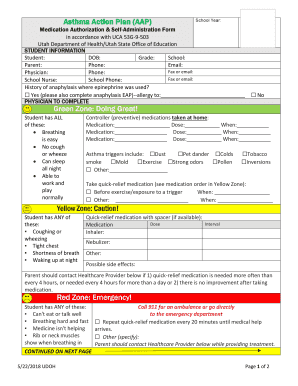
- Begin by filling in the student information section. Provide the student's name, date of birth (DOB), grade, and school details. Ensure that the parent's name, contact information (phone and email), and option for fax or email are also included.
- Complete the physician details. Enter the physician’s name and contact information including phone and fax or email. Indicate if there is a history of anaphylaxis where epinephrine was used, and if so, complete the relevant section for anaphylaxis emergency action plans.
- In the Green Zone section, check off all conditions that apply, such as breathing ease and no cough or wheeze. List any controller medications taken at home, specifying the medication name, dosage, and timing.
- Identify asthma triggers by selecting applicable options like dust, pet dander, or pollen. Specify any additional triggers not listed.
- In the Yellow Zone section, specify any symptoms indicating caution. Fill in details for quick-relief medication, including the dose and method of administration (inhaler or nebulizer). Note the possible side effects.
- Account for emergency situations in the Red Zone section. Indicate any severe symptoms and specified emergency responses, such as repeating quick-relief medication until help arrives.
- In the prescriber section, the physician must confirm their care plan by completing their name and signature, along with the date.
- The parent or guardian needs to fill out their responsibilities, authorizations, and sign in the designated area. This includes choices about whether the student is authorized to carry their medication.
- Review the school nurse section, ensuring all necessary signatures and acknowledgments are made. Confirm medication storage details.
- Once all fields are completed, save any changes, or proceed to download, print, or share the Ironcsd form as required.
Ensure a smooth process by completing your Ironcsd online today.
The IronCAD Design Collaboration Suite is a complete range of CAD products that provides seamless collaboration between 3D and 2D to optimize your engineering teams design process and simplify 3D and 2D CAD data management and communication throughout your organization.