Loading
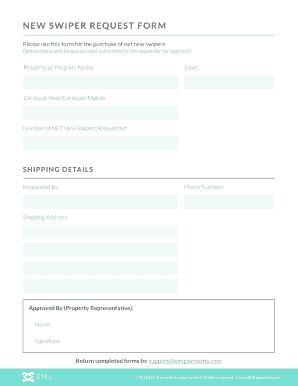
Get New Swiper Request Form - Documents.emlpayments.com
How it works
-

Open form follow the instructions
-

Easily sign the form with your finger
-

Send filled & signed form or save
How to use or fill out the NEW SWIPER REQUEST FORM - Documents.emlpayments.com online
Filling out the NEW SWIPER REQUEST FORM is essential for acquiring new swipers for your property or program. This guide will provide clear and supportive instructions to help you complete the form online accurately and efficiently.
Follow the steps to fill out the NEW SWIPER REQUEST FORM effectively.
- Press the ‘Get Form’ button to access and open the form in your preferred editor.
- Fill in the 'Property or Program Name' field with the name of the facility or program associated with your request.
- Enter the current date in the designated date field to document when the request is being made.
- Specify whether the request is for Cardspot Web or Cardspot Mobile by selecting the appropriate option.
- Indicate the number of net new swipers you wish to request in the 'Number of NET New Swipers Requested' field.
- In the shipping details section, complete the 'Requested By' field with your name.
- Provide your contact phone number in the 'Phone Number' field to ensure you can be reached regarding the request.
- Fill out the 'Shipping Address' with the full address where the swipers should be sent.
- Identify the property representative who will approve the request by filling in their name in the 'Approved By' field.
- Have the property representative provide their signature in the designated signature area.
- Once all sections are completed, ensure to return the completed form to the specified email: support@emlpayments.com.
Start filling out your NEW SWIPER REQUEST FORM online today!
Installing WP Swiper is easy, go to your WordPress admin panel and click on Plugins > Add New, searching for “WP Swiper”. 2. Activate the plugin through the 'Plugins' menu in WordPress.
Industry-leading security and compliance
US Legal Forms protects your data by complying with industry-specific security standards.
-
In businnes since 199725+ years providing professional legal documents.
-
Accredited businessGuarantees that a business meets BBB accreditation standards in the US and Canada.
-
Secured by BraintreeValidated Level 1 PCI DSS compliant payment gateway that accepts most major credit and debit card brands from across the globe.