Loading
Get Acf-ogm-sf-ppr Cover Page 2012
How it works
-

Open form follow the instructions
-

Easily sign the form with your finger
-

Send filled & signed form or save
How to fill out the ACF-OGM-SF-PPR Cover Page online
Filling out the ACF-OGM-SF-PPR Cover Page is an essential step in reporting the progress of your project funded by federal grants. This guide provides clear, step-by-step instructions to help you complete the form accurately and efficiently.
Follow the steps to fill out the ACF-OGM-SF-PPR Cover Page online
- Click ‘Get Form’ button to obtain the form and open it in the editor.
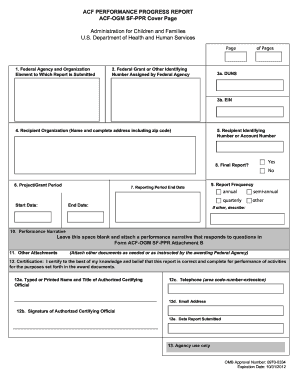
- In the first section, enter the name of the federal agency and organizational element to which your report is being submitted as stated in your award document.
- Next, input the federal grant or other identifying number assigned by the federal agency, as provided in your award documentation.
- You will then provide your DUNS (Data Universal Numbering System) number. This number should be available from the internal records of your organization.
- In the following field, input your Employer Identification Number (EIN) provided by the Internal Revenue Service.
- Enter the full name and address of your recipient organization, including zip code.
- Next, include any recipient identifying number or account assigned by your organization, if applicable. Otherwise, this field can be left blank.
- Indicate the project/grant period by specifying the start date and end date mentioned in your award documents.
- For the reporting period end date, enter the end date of the reporting period according to your reporting frequency, which is defined in your award document.
- Mark whether this is the final report by checking 'yes' or 'no' as appropriate.
- Select the reporting frequency (e.g., semi-annual, quarterly, annual) as stated in your award document.
- In the performance narrative section, leave the space blank and instead attach a separate document detailing your performance narrative.
- Attach any additional documents required or instructed by the awarding federal agency.
- In the certification section, ensure that the authorized certifying official's name, title, signature, contact number, email address, and submission date are accurately recorded.
- Once all fields are completed, you can save changes, download a copy of the form, print it for your records, or share it with the necessary stakeholders.
Complete your documents online now to ensure timely submission and compliance with federal reporting requirements.
Get form
Experience a faster way to fill out and sign forms on the web. Access the most extensive library of templates available.
SF PPR stands for Standard Form Personal Property Report, which is a key document handling personal property claims or reports. It provides necessary details that help in clearly documenting the items involved. When creating an ACF-OGM-SF-PPR Cover Page, understanding SF PPR’s components ensures that all necessary information is presented effectively, making your report more comprehensive.
Get This Form Now!
Use professional pre-built templates to fill in and sign documents online faster. Get access to thousands of forms.