Loading
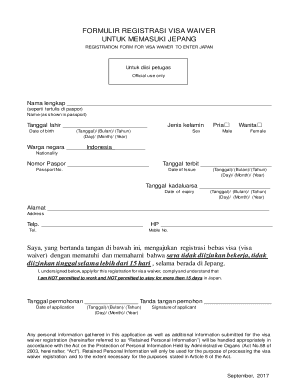
Get Japan Visa Information In India - Home Page - Vfs Global
How it works
-

Open form follow the instructions
-

Easily sign the form with your finger
-

Send filled & signed form or save
How to fill out the Japan Visa Information In India - Home Page - VFS Global online
Completing your visa waiver registration for Japan is a crucial step in your travel plans. This guide will help you understand the necessary steps to fill out the form accurately and efficiently, ensuring a smooth application process.
Follow the steps to successfully complete the online visa waiver registration form.
- Click the ‘Get Form’ button to access the visa waiver registration form.
- Fill in your full name as it appears in your passport in the designated field. Ensure that spelling is accurate to avoid processing delays.
- Enter your date of birth using the format provided: Day/Month/Year. Double-check that the date matches your official documents.
- Select your gender by marking the appropriate box, either 'Male' or 'Female.'
- Indicate your nationality by selecting 'Indonesia' from the provided options.
- Write your passport number in the specified field to link your registration to your identification document.
- Input the date your passport was issued, ensuring to follow the Day/Month/Year format.
- Fill out the expiry date of your passport as well, in the same format as above.
- Provide your address in the space given. Be clear and precise to ensure you can be contacted if necessary.
- List your telephone number and mobile number in the respective fields, ensuring you include accurate country codes if applicable.
- Acknowledge the declaration by confirming you understand the restrictions associated with the visa waiver, particularly regarding work and duration of stay.
- Sign and date the application form to affirm your registration request. Your signature validates the accuracy of the information you have provided.
- After completing the form, review all entries for accuracy. You can then save changes, download, print, or share the application as needed.
Begin your visa waiver registration online today for a hassle-free application experience.
Related links form
Helpline Number: + 81 (0) 120 961 673. Visit the Visa Application Centre to track your application.
Industry-leading security and compliance
US Legal Forms protects your data by complying with industry-specific security standards.
-
In businnes since 199725+ years providing professional legal documents.
-
Accredited businessGuarantees that a business meets BBB accreditation standards in the US and Canada.
-
Secured by BraintreeValidated Level 1 PCI DSS compliant payment gateway that accepts most major credit and debit card brands from across the globe.