Loading
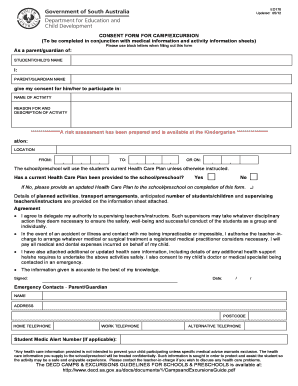
Get Ed170
How it works
-

Open form follow the instructions
-

Easily sign the form with your finger
-

Send filled & signed form or save
How to fill out the Ed170 online
The Ed170 form is a consent document required for students participating in camps and excursions. This guide will provide you with clear, step-by-step instructions on how to complete the form online, ensuring you provide all necessary information.
Follow the steps to accurately complete the Ed170 form.
- Click the ‘Get Form’ button to obtain the Ed170 form and open it in the editor.
- In the first section, enter the student or child's name in block letters as specified. Ensure the spelling is correct to avoid any complications during the activities.
- Next, fill in your name as the parent or guardian in the designated field. This confirms your role and authority regarding the child’s participation.
- Specify the name of the activity in the provided field. This should match the activity for which you are giving consent.
- Provide a brief reason for and description of the activity. This helps clarify the purpose of the excursion or camp to anyone reviewing the form.
- Indicate the location of the activity by filling in the location field. This should be the exact site where the activity will take place.
- Mention the dates and times of the activity in the appropriate fields. This ensures all parties are aware of the schedule.
- Answer the question regarding the current Health Care Plan by selecting 'Yes' or 'No'. If you select 'No', provide the updated Health Care Plan to the school on completion of this form as instructed.
- Review the agreement section, ensuring that you understand and agree to delegate authority to the supervising teachers and instructors mentioned. Your signature confirms this agreement.
- Complete the emergency contacts section with accurate information, including names, addresses, and telephone numbers. This is crucial in case of any emergencies during the activity.
- Finally, review all filled information for accuracy. Once satisfied, save changes to the document, and proceed to download, print, or share the form as needed.
Complete your Ed170 form online today to ensure your child can participate in their exciting activities!
All teachers in Connecticut are required to eventually earn their master's degree. If you're a first-time teacher who already has a bachelor's degree, earning a master's degree is the ideal step to take in order to enter the profession.