Loading
Get Da 5914 2002-2026
How it works
-

Open form follow the instructions
-

Easily sign the form with your finger
-

Send filled & signed form or save
How to fill out the DA 5914 online
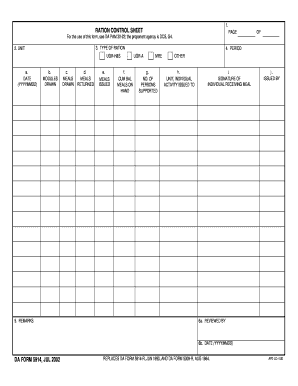
Filling out the DA 5914 form online can streamline your process for submitting ration control information. This comprehensive guide will provide you with clear, step-by-step instructions on how to accurately complete each section of the form.
Follow the steps to successfully complete the DA 5914 form online.
- Click ‘Get Form’ button to access the DA 5914, opening it in your preferred editor for online completion.
- Begin with the type of ration section. You can choose between UGR-H&S, UGR-A, MRE, or Other. Clearly indicate your selection.
- In the unit field, input the appropriate unit designation that corresponds to the ration control activities.
- Enter the date in the specified format (YYYYMMDD) to accurately record when the rations are being accounted for.
- For modules drawn, provide the relevant quantities as applicable. Follow this with the number of meals drawn, returned, and issued.
- In the cumulative balance meals on hand section, indicate how many meals are currently available.
- Specify the number of persons supported through the rations clearly.
- Fill in the unit or individual activity issued to field accurately, making sure to reflect the specifics of the distribution.
- Have the individual receiving the meal sign in the designated signature field. This verifies the receipt of rations.
- Complete the issued by section and have the reviewing authority complete the reviewed by section and date fields.
- Once you have filled in all necessary fields, you can save your changes, download a copy of the form, print it, or share it as needed.
Take the next step by completing your DA 5914 form online today!
Related links form
Filling out a DD93 requires you to provide personal details, including emergency contact and marital status. It is crucial to ensure that your information is up to date, as this form is key in emergency situations. For help, refer to USLegalForms, which can provide templates and additional tips for effectively completing the form.