Loading
Get Wellspanpophealth
How it works
-

Open form follow the instructions
-

Easily sign the form with your finger
-

Send filled & signed form or save
How to fill out the Wellspanpophealth online
Filling out the Wellspanpophealth form is an essential step for those covered under the plan to coordinate benefits efficiently. This guide provides step-by-step instructions to ensure you complete the form accurately and understand each section.
Follow the steps to complete the Wellspanpophealth form effectively.
- Click ‘Get Form’ button to access the Wellspanpophealth form and open it for editing.
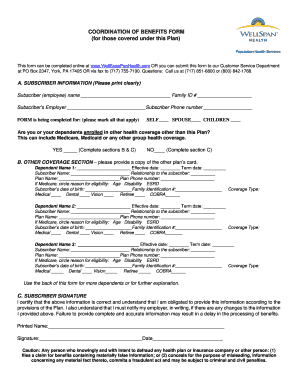
- Begin by entering your subscriber information clearly. This includes your name, family ID number, employer name, and your phone number. Make sure to fill in all fields accurately.
- Indicate for whom you are completing the form by marking the appropriate boxes for yourself, spouse, or children.
- Answer the question regarding other health coverage. If applicable, check 'Yes' and provide details in sections B and C; if not, check 'No' and proceed to section C.
- In the Other Coverage section, provide information for each dependent who has additional health coverage. Include their names, effective dates, term dates, relationship to you, plan name, and plan phone number. If the dependent is enrolled in Medicare, indicate the reason for eligibility.
- For each dependent, specify the coverage type, checking all that apply (medical, dental, vision, retiree, or COBRA).
- If you have more dependents, use the back of the form to add their details or provide further explanations as necessary.
- Finally, in the Subscriber Signature section, print your name, sign the form, and date it. Ensure that you understand your obligation to provide accurate information and the potential consequences of any incorrect information.
- Once you complete the form, review all entries for accuracy. You can then save changes, download, print, or share the form as needed.
Complete your Wellspanpophealth form online today to ensure your benefits are managed smoothly.