Loading
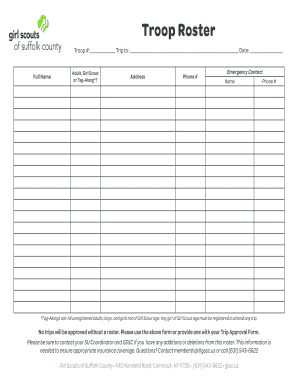
Get Troop #: Trip To: Date:
How it works
-

Open form follow the instructions
-

Easily sign the form with your finger
-

Send filled & signed form or save
How to fill out the Troop #: Trip To: Date: online
Filling out the Troop #: Trip To: Date: form is an important step in organizing your upcoming excursions. This guide will walk you through the process of completing this form online, ensuring that all necessary information is accurately captured.
Follow the steps to successfully complete the form.
- Click the ‘Get Form’ button to access the form and open it in the online editor.
- In the 'Troop #' field, enter the unique identification number assigned to your troop. This number is vital for tracking and organizing your activities.
- Next, locate the 'Trip To:' section. Fill in the destination of your planned trip, providing as much detail as possible to ensure clarity for all participants.
- In the 'Date:' field, input the date of the trip, using the format requested in the form. This information helps coordinate schedules and plan further details.
- For the 'Full Name' section, list the names of all individuals attending the trip, including adults, Girl Scouts, and Tag-Alongs. Ensure you categorize each person appropriately.
- In the 'Adult, Girl Scout or Tag-Along?' column next to each name, indicate the person's status. Use 'Adult' for registered adults, 'Girl Scout' for participants of Girl Scout age, and 'Tag-Along' for unregistered individuals.
- Complete the 'Address' field for each participant, ensuring accurate information for communication and emergency purposes.
- Fill in the 'Phone #' section with the contact numbers of each participant. This aids in quick communication if needed during the trip.
- Next, in the 'Emergency Contact Name' field, enter the name of a designated emergency contact for each person. This is crucial for safety measures.
- Finally, input the 'Emergency Contact Phone #' to ensure that the contact can be reached quickly in case of an emergency.
- After all fields are filled out accurately, save your changes. You can also download, print, or share the form to ensure it is submitted along with your Trip Approval Form.
Complete your Troop #: Trip To: Date: form online today to ensure a successful trip planning experience.
Others, such as Bryan Garner, hold that any number of people can be referred to as troops, so long as there are at least two. But when the plural appears with a large number, it is understood to mean individuals: There were an estimated 150,000 troops in Iraq. (But not: Three troops were injured.)