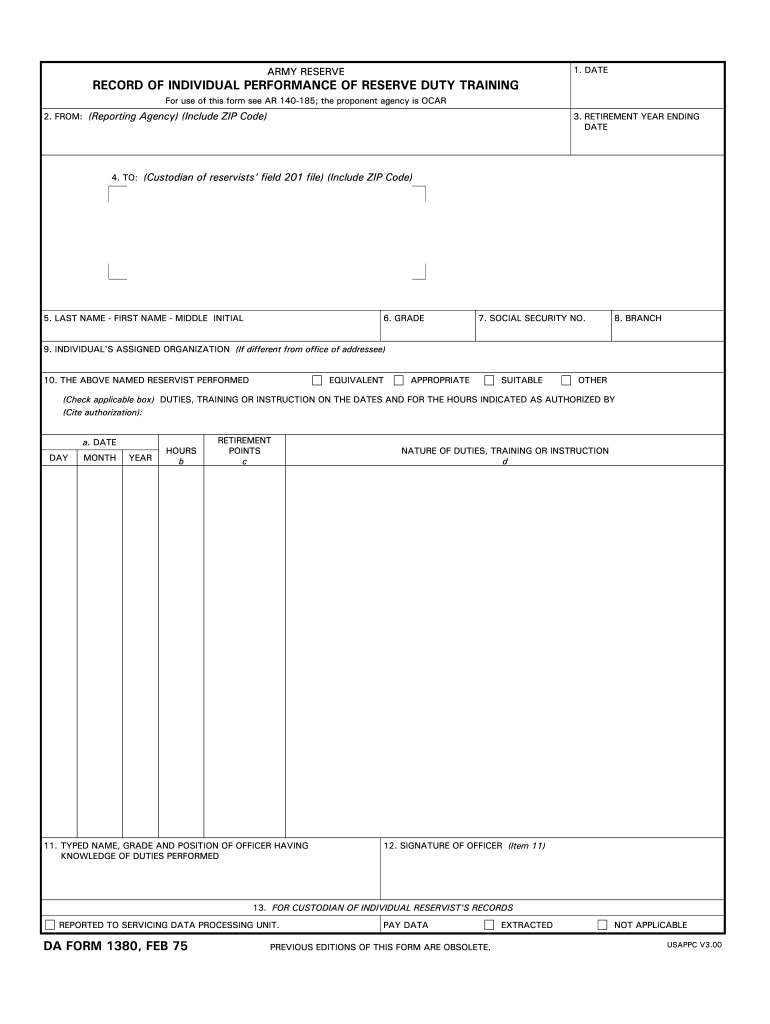
ENT YEAR ENDING DATE 4. TO: (Custodian of reservists' field 201 file) (Include ZIP Code) 5. LAST NAME - FIRST NAME - MIDDLE INITIAL 6. GRADE 7. SOCIAL SECURITY NO. 8. BRANCH 9. INDIVIDUAL'S ASSIGNED ORGANIZATION (If different from office of addressee) 10. THE ABOVE NAMED RESERVIST PERFORMED EQUIVALENT APPROPRIATE SUITABLE OTHER (Check applicable box) DUTIES, TRAINING OR INSTRUCTION ON THE DATES AND FOR THE HOURS INDICATED AS AUTHORIZED BY (Cite authorization): a. DATE DAY MONTH YEA.
Loading

Open form follow the instructions

Easily sign the form with your finger

Send filled & signed form or save
How to fill out the DA 1380 online
The DA Form 1380 is used to record individual performance of reserve duty training. Completing this form online can streamline the process and ensure accurate documentation of training activities.
Follow the steps to successfully fill out the DA 1380 online.
- Click ‘Get Form’ button to access the form and open it in the editor.
- Fill in the date on the top of the form, indicating when the form is being prepared.
- In section 2, input the from address of the reporting agency, ensuring to include the ZIP code.
- Provide the retirement year ending date in section 3.
- In section 4, enter the custodian’s address information, complete with their ZIP code.
- Section 5 requires you to fill in the individual's last name, first name, and middle initial.
- In section 6, input the grade of the individual.
- Complete section 7 by entering the individual's Social Security number.
- Fill in section 8 with the appropriate branch of service.
- In section 9, state the individual's assigned organization, if it differs from the office of the addressee.
- In section 10, check the applicable box that indicates the type of duties performed and describe the duties, training, or instruction in section 10d. Provide the cited authorization.
- Enter the specific dates and hours worked as indicated in Column 'a' and 'b' under section 10.
- Indicate the retirement points earned in section 10c.
- In section 11, fill in the typed name, grade, and position of the officer who knows the duties performed.
- Verify the accuracy of all entered information before proceeding.
- The officer identified in section 11 must sign the form in section 12.
- After completing the form, save changes. You can then download, print, or share the completed form as necessary.
Complete your documents online for a more efficient process.
Experience a faster way to fill out and sign forms on the web. Access the most extensive library of templates available.
Related content
... DA 1380. AD orders of 7 days or less are paid after duty performance. The unit or RPAC...
Prepare DA Form 1380 by the last day of each month, to cover the following: a. Nonunit...
STOC. TDC SY & SW8 are full automatic watermakers designed for the production of high...
Get answers to your most pressing questions about US Legal Forms API.
How to fill out a DA form 1380?
Filling out the DA Form 1380 requires careful attention to detail. Start by completing the identification sections, then provide specific information about the activities you are reporting. Make sure to review each entry for accuracy before submitting. For assistance and templates, remember that US Legal Forms is a reliable platform to explore.
How do I check my PPW on Ippsa?
You can check your PPW in IPPS-A by logging into your account and navigating to the section designated for personnel records. Once located, enter the relevant filters to retrieve your PPW. If there are discrepancies or if you have questions about the data, it's advised to contact your administrative office for clarification.
How to fill out dd 1380?
Filling out the DD 1380 requires you to accurately enter the details of your incident or activity. This includes your unit, dates, and specific nature of the event. Be mindful to use clear and concise language to prevent misunderstandings. If you need further support, US Legal Forms offers templates that can help you navigate filling out the DD 1380 effectively.
How to submit 1380 in ippsa?
To submit your DA 1380 in IPPS-A, first log into the system using your credentials. Once logged in, navigate to the appropriate section for submitting DA forms, select DA 1380, and upload your completed document. Ensure that you follow all prompts carefully to confirm submission, and reach out to your support team if you face any challenges.
Who signs 1380?
The DA 1380 must be signed by authorized personnel in your chain of command. Typically, this would be your immediate supervisor or officer who can verify the information you provided. Ensure that the person signing the form has up-to-date authority to avoid any issues in the processing of your report. For more information on signature requirements, check related resources at US Legal Forms.
How to fill out 1380 army?
Filling out the DA 1380 army involves several key steps. Start by gathering the necessary information regarding your military service and the time you are reporting. Make sure to provide accurate entries in every section to ensure your report is valid. If you need detailed guidance, consider visiting US Legal Forms for resources to assist you with the DA 1380.
Who signs DA 1380?
Similar to the previous question, the DA 1380 must be signed by the appropriate authority, typically the unit commander. This signature is crucial as it validates the report and acknowledges the information recorded. Ensuring that the right personnel is involved in signing off on the DA 1380 maintains the report's integrity and adheres to military protocols. Always verify that signatures are current and valid before submission.
How to complete a DA 1380?
Completing a DA 1380 requires you to fill in specific details about the situation being reported, including the required supporting information. Make sure to adhere to military guidelines during the documentation process, as accuracy is key. Review your completed form for clarity and completeness, as missing information can hinder the processing of your DA 1380. If you need assistance, check resources available on platforms like USLegalForms.
How to fill out dd form 1380?
To fill out the DD Form 1380, gather all necessary details regarding the event or incident you are reporting. Ensure you include the time, location, and names of involved parties in the DA 1380. Carefully review each section of the form before submission to eliminate errors. Clear and precise entries can improve the overall credibility of the report.
What is DA form 1380?
The DA form 1380 performs a key role in military aviation documentation. This form records flight activities, including flight hours and types of missions undertaken by aviators. Utilizing the DA 1380 ensures that vital information is preserved for future reference and qualification assessments, enhancing the effectiveness of flight operations.
Use professional pre-built templates to fill in and sign documents online faster. Get access to thousands of forms.
If you believe that this page should be taken down, please follow our DMCA take down process here.
This form is available in several versions. Select the version you need from the drop-down list below.