Loading
Get Bay Form Picture
How it works
-

Open form follow the instructions
-

Easily sign the form with your finger
-

Send filled & signed form or save
How to fill out the Bay Form Picture online
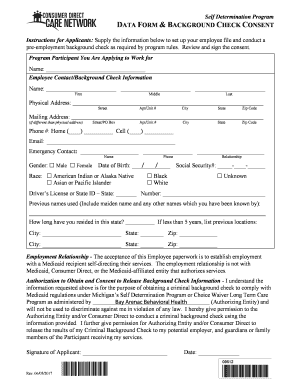
The Bay Form Picture is a critical document for prospective employees seeking to work with Bay Arenac Behavioral Health. This guide provides step-by-step instructions on how to complete the form efficiently online.
Follow the steps to fill out the Bay Form Picture online with ease.
- Click the 'Get Form' button to access the Bay Form Picture and open it online in your preferred editor.
- Begin by entering the name of the program participant you are applying to work for in the specified field. Ensure you provide the correct Employer Name as required.
- Fill in your personal details under Employee Contact/Background Check Information including First, Middle, and Last Names, along with your Physical Address, Mailing Address (if different), Phone numbers, and Email.
- Provide the Emergency Contact's name and relationship along with their phone number. Specify your Gender, Date of Birth, and Race by selecting the appropriate option.
- Enter your Social Security Number and Driver's License or State ID information. If you have used any previous names, list those in the designated section.
- Indicate how long you have resided in the current state and list previous locations if you have moved in the last five years.
- Complete the Employment Relationship section, confirming your relationship with the participant receiving services and any necessary disclosures.
- Review the Authorization to Obtain and Consent to Release Background Check Information section, where you must sign and date to authorize the background check.
- Ensure all sections are filled accurately, save any changes made to the document.
- You can now download, print, or share your completed Bay Form Picture as needed.
Complete the Bay Form Picture online today to kickstart your employment process!
National Database and Registration Authority (NADRA) was established as National Database Organization (NDO), an attached department under the Ministry of Interior, Government of Pakistan in 1998.
Industry-leading security and compliance
US Legal Forms protects your data by complying with industry-specific security standards.
-
In businnes since 199725+ years providing professional legal documents.
-
Accredited businessGuarantees that a business meets BBB accreditation standards in the US and Canada.
-
Secured by BraintreeValidated Level 1 PCI DSS compliant payment gateway that accepts most major credit and debit card brands from across the globe.