Loading
Get 877 228 7909
How it works
-

Open form follow the instructions
-

Easily sign the form with your finger
-

Send filled & signed form or save
How to fill out the 877 228 7909 online
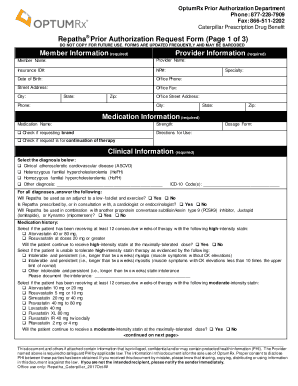
Filling out the 877 228 7909 form is an essential step in requesting prior authorization for medication. This guide will provide clear, step-by-step instructions on how to properly complete the form online, ensuring you provide all necessary information without confusion.
Follow the steps to successfully complete the 877 228 7909 form.
- Press the ‘Get Form’ button to access the document and open it in your preferred online editor.
- Begin by filling out the member information section, which includes mandatory fields such as member name, insurance ID number, and date of birth. Ensure that all information is accurate and up-to-date.
- Next, complete the provider information section. This will require you to provide the name of the healthcare provider, office phone, and NPI number among other details.
- In the medication information section, indicate the medication name and its strength. Mark whether you are requesting the brand version of the medication and provide the directions for use.
- Proceed to the clinical information section. Select the appropriate diagnosis from the options provided and include relevant ICD-10 codes if applicable.
- Answer the questions regarding the patient's medication history and statin intolerance accurately. If applicable, provide documentation for any intolerance in the space provided.
- If this is a reauthorization request, make sure to answer the additional reauthorization questions regarding the patient's adherence to therapy and ongoing treatment plans.
- Review all information provided in each section for completeness and accuracy before proceeding.
- After confirming that all information is correct, you can save the form, download a copy for your records, or print it for submission. Consider sharing it with the appropriate parties as necessary.
Complete your prior authorization requests online by filling out the 877 228 7909 form today!
Visit Cat @work (catatwork.cat.com) > Compensation & Benefits > Pay & Financial Security > Pay & Deductions to: View and print your pay stub. Use the paycheck modeler. Change your tax withholdings. Set up or change direct deposit. View and print your W-2. Access payroll FAQs.