Loading
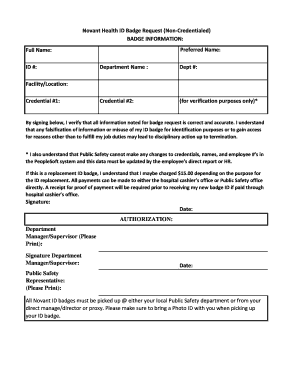
Get Novant Health Peoplesoft
How it works
-

Open form follow the instructions
-

Easily sign the form with your finger
-

Send filled & signed form or save
How to fill out the Novant Health Peoplesoft online
Filling out the Novant Health Peoplesoft form is an essential step in obtaining your ID badge. This guide provides clear and detailed instructions to help you complete the form accurately and efficiently.
Follow the steps to successfully submit your Novant Health ID badge request online.
- Click ‘Get Form’ button to access the Novant Health ID Badge Request form and open it for editing.
- In the badge information section, enter your preferred name. This name will appear on your ID badge.
- Next, fill in your full name as it appears in official records. Ensure accuracy for verification.
- Input your ID number, which is crucial for identification purposes.
- Specify your department name where you are employed. This helps in validating your request.
- Enter your department number, which provides additional context for your role.
- If applicable, provide credential number two for verification purposes.
- Indicate the facility or location you will be working at to link your badge to the correct site.
- Enter credential number one for the primary credential associated with your position.
- Sign in the designated area to verify that all provided information is correct, acknowledging the consequences of providing false information.
- Date your signature to confirm the timeframe of your request.
- In the authorization section, have your department manager or supervisor print their name and sign. Ensure their date is also included.
- A Public Safety representative must print their name and sign in the final authorization field.
- Once all sections are complete, review the form for accuracy, then save any changes. You can download, print, or share the completed form as needed.
Complete your Novant Health Peoplesoft document online today to efficiently manage your ID badge request.
Novant Health TypeNonprofit Health SystemHeadquarters2085 Frontis Plaza Boulevard, Winston-Salem, North Carolina , United StatesNumber of locations15 hospitals 674+ outpatient locations 30+ imaging centers 605+ physician clinics (2019)Area servedVirginia, North Carolina, South Carolina, Georgia11 more rows
Industry-leading security and compliance
US Legal Forms protects your data by complying with industry-specific security standards.
-
In businnes since 199725+ years providing professional legal documents.
-
Accredited businessGuarantees that a business meets BBB accreditation standards in the US and Canada.
-
Secured by BraintreeValidated Level 1 PCI DSS compliant payment gateway that accepts most major credit and debit card brands from across the globe.