Loading
Get Bayer Us Patient Assistance Foundation Application
How it works
-

Open form follow the instructions
-

Easily sign the form with your finger
-

Send filled & signed form or save
How to fill out the Bayer Us Patient Assistance Foundation Application online
Filling out the Bayer Us Patient Assistance Foundation Application online can be a straightforward process when you have the right guidance. This guide provides step-by-step instructions to help you complete the application accurately and efficiently.
Follow the steps to successfully complete your application.
- Click ‘Get Form’ button to obtain the form and open it in the designated editor.
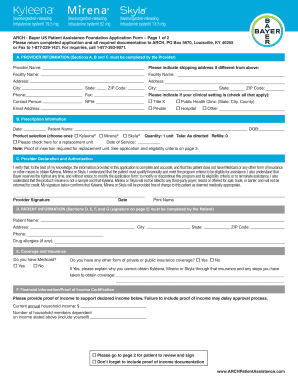
- Begin with Section A, where the provider must fill out their information. Include provider name, shipping address if different, facility name, address, city, state, ZIP code, phone, fax, and indicate the clinical setting type. Ensure the contact person's details including NPI number and email address are complete.
- In Section B, record the prescription information. Put in the date, patient name, date of birth, and select the product (Kyleena, , Skyla). Note the quantity, administration instructions, and if applicable, a request for a replacement unit.
- Proceed to Section C where the provider must declare and authorize. This includes signing and dating the application, confirming the provided information's accuracy and the patient’s financial status.
- Move to Section D for patient information. Fill out the patient’s name, address, city, state, ZIP code, phone, and any drug allergies.
- In Section E, address the coverage and insurance. Indicate whether the patient has Medicaid or other forms of insurance. If applicable, provide details explaining why assistance is needed.
- Complete Section F regarding financial information. State the current annual household income and the number of household members dependent on this income. Remember to include proof of income documentation as required.
- Finally, in Section G, the patient or their representative must provide a signature, date the application, and print their name. If signed by a representative, indicate the relationship to the patient.
- After reviewing the form for completeness, ensure to save changes, download, print, or share the application as necessary before submission.
Start your application online today to access the assistance you need.
If you are a new patient, you can start on KERENDIA at NO COST for the product by using the KERENDIA Free Trial Voucher. New patients are eligible for the (30-day) Free Trial Voucher,† regardless of insurance. It's easy for new patients to get or activate a KERENDIA Free Trial Voucher.