Loading
Get Nat 8676
How it works
-

Open form follow the instructions
-

Easily sign the form with your finger
-

Send filled & signed form or save
How to fill out the Nat 8676 online
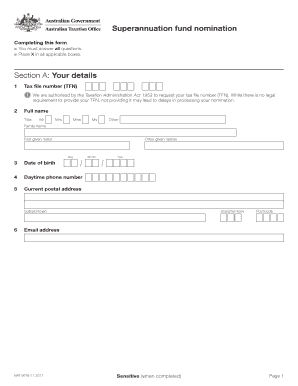
Filling out the Nat 8676 form for superannuation fund nomination is an important process for ensuring your retirement savings are directed according to your wishes. This guide will provide you with clear, step-by-step instructions on how to complete the form successfully online.
Follow the steps to complete the Nat 8676 form online
- Click the ‘Get Form’ button to obtain the Nat 8676 form and open it for editing.
- In Section A: Your details, provide your Tax file number (TFN). Although providing your TFN is not legally required, omitting it may cause delays. Fill in your full name, including family name and given names, and indicate your title.
- Move to Section B: Fund details. Here, you will need to provide the ABN of the superannuation fund or RSA. Then, enter the full name of the superannuation fund or RSA, followed by the unique superannuation identifier.
- In Section C, review the statements on penalties and privacy. It is crucial to understand the implications of providing false information.
- Finally, after reviewing all entered information for accuracy, you can save changes made to the document. You may also choose to download, print, or share the completed form as needed.
Complete your Nat 8676 form online to ensure your superannuation funds are allocated according to your wishes.
Employees. Use the form to advise an employer of your choice of super fund. You need to provide the information requested so your employer can make contributions to your nominated super fund. Where your super guarantee should be paid is your choice.