Loading
Get Drawback Claimdemande De Drawback - Agence Des Services ...
How it works
-

Open form follow the instructions
-

Easily sign the form with your finger
-

Send filled & signed form or save
How to fill out the Drawback Claimdemande De Drawback - Agence Des Services ... online
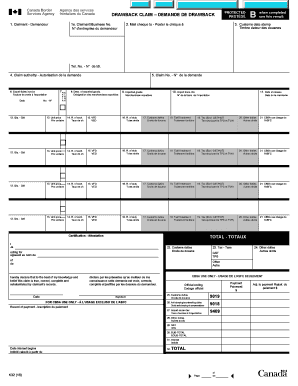
This guide provides a clear and supportive walkthrough for individuals looking to complete the Drawback Claimdemande De Drawback form online. Whether you are familiar with legal documentation or not, these step-by-step instructions will help you successfully file your claim.
Follow the steps to complete your Drawback Claimdemande De Drawback form.
- Click ‘Get Form’ button to access the form and open it in the editing tool provided.
- In the claimant section, enter the claimant's name, full address, postal code, and telephone number.
- For claimant/business number, enter the Importer Number or Business Number associated with the claimant.
- In the mail cheque to section, specify the name and full address of the broker, or indicate 'SAME' if filing on your own.
- Leave the customs date stamp section blank as instructed.
- Provide the claim authority by referencing the relevant legislation and D Memorandum.
- Leave the claim number section blank.
- Input the number and date of the export sales invoice in the export sales invoice section.
- If goods were exported to a NAFTA country, mark the appropriate section.
- Describe the exported goods that are subject to the drawback in the provided field.
- List the imported goods in the corresponding section.
- Enter the import transaction numbers as indicated on the import entry Form B3.
- Specify the date of release from customs.
- Indicate the quantity of imported products for which you are claiming the drawback.
- Fill in the unit price of the imported goods.
- Provide the applicable exchange rate for the goods subject to the drawback.
- Calculate and enter the value for duty based on the previous columns.
- Indicate the duty rate applicable to the imported goods.
- Calculate and enter the total customs duties claimed.
- If applicable, provide the tariff treatment for NAFTA exports.
- Enter the total tax claimed excluding GST/HST if applicable.
- Input any other special duties claimed on the form.
- Leave the section for CBSA use blank.
- Enter the total customs duties claimed on the form.
- If applicable, enter the total tax claimed.
- Indicate any other duties claimed.
- Ensure the claimant's certification is completed and signed by the claimant or authorized agent.
- Once all sections are completed, save your changes, and you may choose to download, print, or share the form.
Start completing your Drawback Claim online today.
Earlier, the Board had clarified that in the case of merchant exporter who procure export goods from the open market, the benefit of All Industry Rates of Duty Drawback shall be restricted to the Customs allocation only, if any; and that export goods purchased from the market shall be treated as having availed the ...