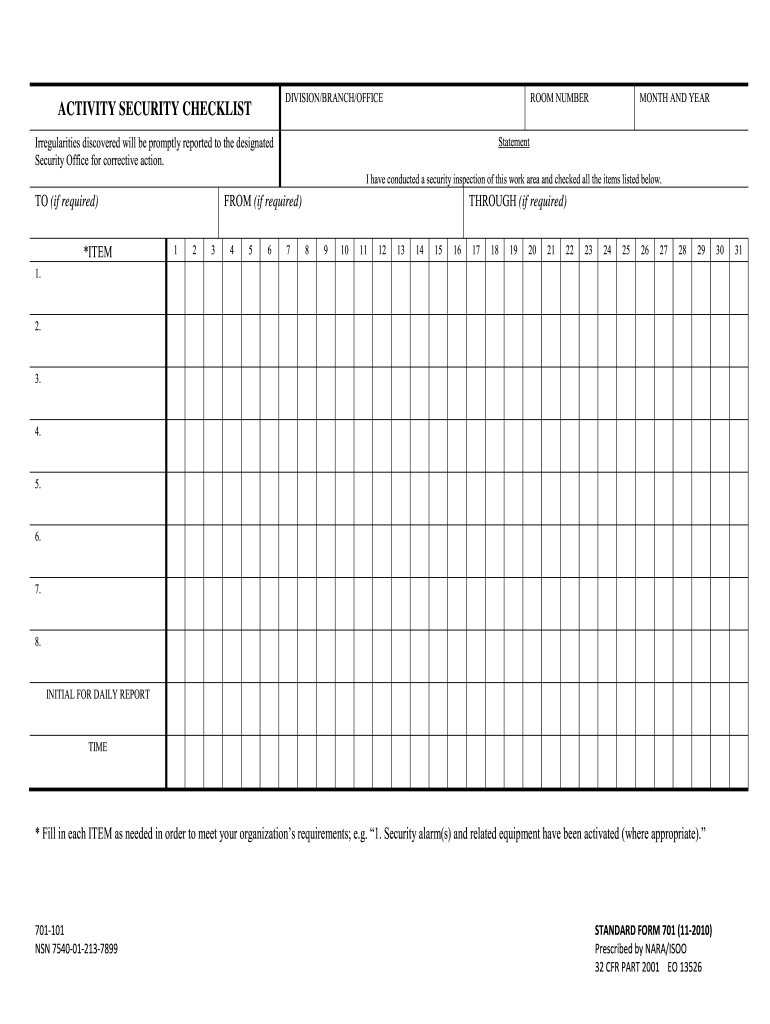
Ement I have conducted a security inspection of this work area and checked all the items listed below. TO (if required) *ITEM FROM (if required) 1 2 3 4 5 6 7 THROUGH (if required) 8 9 10 11 12 13 14 15 16 17 18 19 20 21 22 23 24 25 26 27 28 29 1. 2. 3. 4. 5. 6. 7. 8. INITIAL FOR DAILY REPORT TIME * Fill in each ITEM as needed in order to meet your organization’s requirements; e.g. “1. Security alarm(s) and related equipment have been activated (where.

Open form follow the instructions

Easily sign the form with your finger

Send filled & signed form or save
How to fill out the NARA SF 701 online
Filling out the NARA SF 701 form online is a straightforward process designed to help you document the security inspection of your work area. This guide will provide you with a clear, step-by-step approach to completing the form accurately and efficiently.
Follow the steps to complete the NARA SF 701 form online.
- Click the ‘Get Form’ button to access the NARA SF 701 form online, enabling you to open it for editing.
- Begin by filling in the 'Division/Branch/Office' section with the relevant information pertaining to your specific location.
- Enter the 'Room Number' where the security inspection is taking place.
- Identify the 'Month and Year' of the inspection, ensuring it reflects the date of the activity.
- Include the statement confirming that you have conducted a security inspection of the work area in the provided field.
- If required, fill in the 'To' and 'From' sections with the necessary names or titles associated with the inspection.
- Document any irregularities found during the inspection in the appropriate item fields (from 1 to 30), carefully checking each item listed to meet organizational requirements.
- Sign off on the inspection by initializing the 'Initial for Daily Report' field and recording the 'Time' of the inspection.
- Once all information is accurately filled out, you can save your changes, download the completed form, print it, or share it with the relevant authorities.
Start filling out the NARA SF 701 form online to ensure your workspace security is documented properly.
Experience a faster way to fill out and sign forms on the web. Access the most extensive library of templates available.
Related content
Security alarm(s) and related equipment have been activated (where appropriate).”...
NARA is the nation's record keeper. Their mission is providing ... SF 701. Activity...
by L Rozsa · Cited by 15 — Crystal growth is a favorite subject of crystallization...
Get answers to your most pressing questions about US Legal Forms API.
What is the purpose of the SF 701?
The purpose of the NARA SF 701 is to establish a reliable method for the destruction of sensitive information, thereby safeguarding it from unauthorized access. This form also plays a critical role in ensuring that agencies comply with federal regulations regarding record maintenance and disposal. Utilizing the SF 701 contributes to better data security practices within your organization.
What is SF 701 used for?
The NARA SF 701 is used primarily to document the proper disposal of sensitive information. It serves as a formal record that helps agencies track the destruction of these materials, which is vital for compliance with federal guidelines. By utilizing the SF 701, you enhance your organization’s accountability in handling sensitive data.
What is the SF 701 policy?
The NARA SF 701 policy outlines the procedures for the disposal of sensitive information, ensuring that agencies handle these records responsibly. It mandates a systematic approach to record retention and destruction to minimize the risk of unauthorized access. Following this policy is crucial for maintaining confidentiality and security in your operations.
What is the difference between SF 701 and 702?
The NARA SF 701 focuses on the safeguarding of sensitive information by documenting the proper disposal of such materials. In contrast, the SF 702 is tailored for the security of classified documents, detailing the control and maintenance of these items. Understanding this distinction helps agencies comply effectively with federal documentation standards.
How long do you keep SF 701?
You should keep the NARA SF 701 for a minimum of two years after the date of the last action. This duration allows for proper record retention and ensures compliance with federal guidelines. After this period, you can securely dispose of the records, aligning with the NARA's regulations for document management.
When opening and closing a security container, what form is used?
When you open or close a security container, the NARA SF 701 form is essential. This form documents the transition of security and is vital for maintaining the integrity of sensitive information. Completing the SF 701 effectively safeguards your organizational security.
What is the SF 700 form used for?
The SF 700 form serves as a security container information form that provides crucial details about the security container and its contents. It plays a vital role in ensuring accountability and traceability of sensitive materials. This form works alongside the NARA SF 701, creating a comprehensive security framework.
When must the SF 701 activity security checklist be completed?
The activity security checklist using the NARA SF 701 must be completed daily. This regular documentation helps ensure that security protocols are actively followed and any discrepancies are addressed promptly. By consistently completing this checklist, you foster a secure environment for sensitive information.
How long do you keep SF701?
Generally, it is recommended to retain the SF 701 forms for at least two years. This retention period aligns with federal guidelines that emphasize the importance of documentation for security practices. Keeping these forms organized allows you to track security compliance and can be useful during audits.
What is a SF 701 form?
The SF 701 form is a pivotal document used to record the daily security checklist for sensitive areas. This form ensures that security measures are consistently monitored and maintained, preventing any potential breaches. Utilizing the NARA SF 701 form is essential for adhering to federal guidelines and enhanced security protocols.
Use professional pre-built templates to fill in and sign documents online faster. Get access to thousands of forms.
If you believe that this page should be taken down, please follow our DMCA take down process here.