Loading
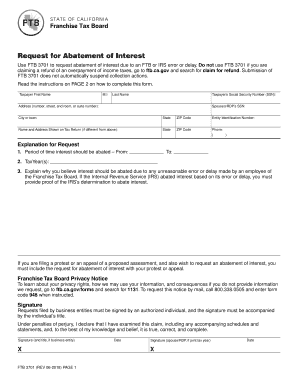
Get Ftb 3701 Request For Abatement Of Interest. Ftb 3701, Request For Abatement Of Interest
How it works
-

Open form follow the instructions
-

Easily sign the form with your finger
-

Send filled & signed form or save
How to fill out the FTB 3701 Request For Abatement Of Interest online
Filling out the FTB 3701 Request For Abatement Of Interest is an important process for users who are seeking relief from interest charges due to errors or delays by the Franchise Tax Board or the Internal Revenue Service. This guide provides clear, step-by-step instructions to ensure users can complete the form accurately and efficiently.
Follow the steps to complete your FTB 3701 request.
- Click ‘Get Form’ button to access the FTB 3701 form and open it in your preferred editing tool.
- Provide your first name, middle initial, and last name in the respective fields.
- Enter your Social Security Number (SSN) in the designated box.
- Fill in your address, including the number, street, and any room or suite number.
- Include the city or town, state, and ZIP code for your residence.
- If applicable, enter your spouse's or registered domestic partner's (RDP) SSN.
- If filing for a business entity, provide the Entity Identification Number.
- If the name and address on your tax return differ from the information provided, enter that information in the spaces provided.
- Enter a phone number where you can be reached.
- Specify the period of time for which you are requesting abatement by entering the dates in the 'From' and 'To' fields.
- List the tax year(s) related to your request in the corresponding section.
- In the space provided, explain the reasons for your abatement request, focusing on any unreasonable errors or delays.
- If you are including evidence of IRS determination, attach that documentation as well.
- Sign and date the form. If filing jointly, include your spouse's or RDP's signature.
- Once completed, save your changes, and choose to download, print, or share the form as needed.
Start your request for abatement of interest online today and ensure your form is filled out correctly!
Reasonable cause may be established if a taxpayer can show that failure to comply with the law occurred despite the exercise of ordinary business care and prudence. For more information on reasonable cause, go to ftb.ca.gov and search for reasonable cause.
Industry-leading security and compliance
US Legal Forms protects your data by complying with industry-specific security standards.
-
In businnes since 199725+ years providing professional legal documents.
-
Accredited businessGuarantees that a business meets BBB accreditation standards in the US and Canada.
-
Secured by BraintreeValidated Level 1 PCI DSS compliant payment gateway that accepts most major credit and debit card brands from across the globe.