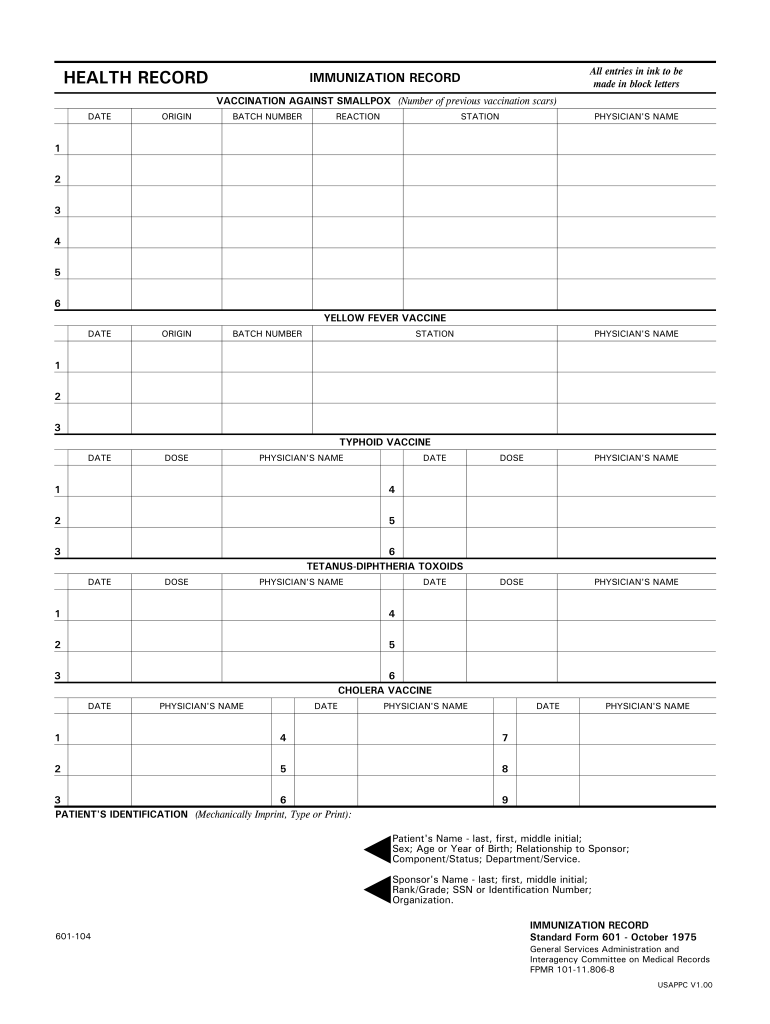
HEALTH RECORD All entries in ink to be made in block letters IMMUNIZATION RECORD VACCINATION AGAINST SMALLPOX Number of previous vaccination scars DATE ORIGIN BATCH NUMBER DOSE REACTION STATION PHYSICIAN S NAME YELLOW FEVER VACCINE TYPHOID VACCINE TETANUS-DIPHTHERIA TOXOIDS CHOLERA VACCINE PATIENT S IDENTIFICATION Mechanically Imprint Type or Print Patient s Name - last first middle initial Sex Age or Year of Birth Relationship to Sponsor Component/Status Department/Service. Sponsor s Name - last first middle initial Rank/Grade SSN or Identification Number Organization. 601-104 Standard Form 601 - October 1975 General Services Administration and Interagency Committee on Medical Records FPMR 101-11. HEALTH RECORD All entries in ink to be made in block letters IMMUNIZATION RECORD VACCINATION AGAINST SMALLPOX Number of previous vaccination scars DATE ORIGIN BATCH NUMBER DOSE REACTION STATION PHYSICIAN S NAME YELLOW FEVER VACCINE TYPHOID VACCINE TETANUS-DIPHTHERIA TOXOIDS CHOLERA VACCINE P....
Loading

Open form follow the instructions

Easily sign the form with your finger

Send filled & signed form or save
How to fill out the GSA SF 601 online
The GSA SF 601 is an essential document for maintaining health and immunization records. This guide provides step-by-step instructions on how to fill out the form online, ensuring you accurately record all necessary information.
Follow the steps to successfully complete the GSA SF 601 form.
- Click ‘Get Form’ button to obtain the form and open it in the editor.
- Begin by entering the patient's identification information. This includes the patient's name (last, first, middle initial), sex, age or year of birth, relationship to the sponsor, component/status, department/service, and the sponsor's details (name, rank/grade, SSN or identification number, organization).
- In the immunization record sections, fill in the details for each vaccination received. Record the date of vaccination, the origin of the vaccine, the batch number, and the physician's name for smallpox, yellow fever, typhoid, tetanus-diphtheria toxoids, cholera vaccine, oral poliovirus vaccine, influenza vaccine, other immunizations, and sensitivity tests.
- For each vaccine listed, ensure you provide details such as the dose administered and any reactions noted. This includes spaces for recording results from sensitivity tests.
- Review all entries to ensure that information is accurate and complete. All entries should be printed in block letters using ink.
- Once all sections are filled out, save your changes. You can download, print, or share the completed form as needed.
Start filling out your GSA SF 601 form online today!
Experience a faster way to fill out and sign forms on the web. Access the most extensive library of templates available.
Related content
Standard Form 601--October 1975 (Rev.) General Services Administration & Interagency...
Reportable surplus property is set aside for donation upon receipt of an information copy...
Óleo de marca HD da classificação API SF, SG ou SH; São permitidos ... 601 Head rechts...
Get answers to your most pressing questions about US Legal Forms API.
How to get a GSA contract number?
To obtain a GSA contract number, you need to complete the application process for a GSA schedule. Once your offer is approved, the GSA will assign you a contract number, which will be essential for all future transactions. Familiarizing yourself with the details in the GSA SF 601 can help you understand the requirements for this application. Using platforms like US Legal Forms can support you in ensuring your application is correctly submitted.
How to get on a GSA approved vendor list?
To get on a GSA approved vendor list, you must first apply for a GSA schedule and fulfill all requirements outlined in the GSA SF 601. This process includes demonstrating your qualifications and the value your products or services provide. Once approved, your business will be listed as a GSA vendor, allowing you to compete for federal contracts. Utilize resources like US Legal Forms to streamline your application.
How to become a federal government vendor?
To become a federal government vendor, begin by registering in the System for Award Management (SAM). This registration ensures you are eligible to bid on government contracts. Additionally, familiarize yourself with the GSA SF 601, which outlines the necessary documentation and compliance requirements for contracting with the federal government. Using platforms like US Legal Forms can simplify the process and provide the necessary forms.
Use professional pre-built templates to fill in and sign documents online faster. Get access to thousands of forms.
If you believe that this page should be taken down, please follow our DMCA take down process here.