Loading
Get 3 Common Application Form
How it works
-

Open form follow the instructions
-

Easily sign the form with your finger
-

Send filled & signed form or save
How to fill out the 3 Common Application Form online
Filling out the 3 Common Application Form is an essential step for applicants seeking admission to degree colleges in the State of Odisha. This guide provides a clear, step-by-step approach to ensure that you complete the form accurately and efficiently.
Follow the steps to fill out the 3 Common Application Form online.
- Click ‘Get Form’ button to obtain the form and open it in the editor.
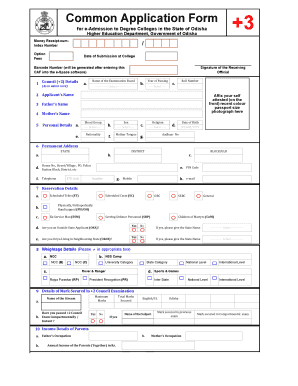
- In the first section, 'Council (+2) Details', enter the name of the examination board as shown on your admit card, select the year of passing from the dropdown, and provide your roll number.
- In 'Applicant's Name', affix your self-attested recent color passport size photograph in the designated space.
- Complete the 'Personal Details' section by filling in your blood group, nationality, sex, mother tongue, religion, date of birth in the specified format, and Aadhaar number.
- Provide your permanent address in the designated fields including state, district, house number, street/village, postal address, telephone std code and number, mobile number, email, and pin code.
- In the 'Reservation Details' section, indicate if you belong to any of the categories such as scheduled caste, scheduled tribe, OBC, etc., and specify if you are an outside state applicant or an Oriya living in neighboring state.
- For 'Weightage Details', mark if you have participated in activities that qualify for weightage like NCC, NSS, or sports, and provide the state name if applicable.
- Fill in your marks obtained in the +2 Council Examination, including the name of the stream, have you passed compartmentally, maximum marks, and subject details.
- In the 'Income Details of Parents' section, provide the occupations and annual income of both parents.
- Complete the 'Bank Information' section by entering the account number, bank name, IFSC number, MICR code, and branch name.
- Record the last educational institution attended by providing the name, location, district, year of joining, and year of leaving.
- In the 'Options/Choices Details' section, list your college choices and stream preferences.
- Read and accept the undertaking by signing where indicated and providing the date and place of submission.
- Once all fields are completed and reviewed, you can save changes, download, print, or share the form as needed.
Complete your application online to ensure a smooth admission process.
Sharing how experiences or accomplishments have fueled your personal development can demonstrate maturity and the ability to handle change to admissions counselors. Personal growth and how you respond is definitely one of the most common college essay topics you'll encounter.
Industry-leading security and compliance
US Legal Forms protects your data by complying with industry-specific security standards.
-
In businnes since 199725+ years providing professional legal documents.
-
Accredited businessGuarantees that a business meets BBB accreditation standards in the US and Canada.
-
Secured by BraintreeValidated Level 1 PCI DSS compliant payment gateway that accepts most major credit and debit card brands from across the globe.