Loading
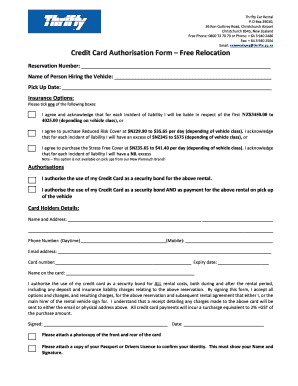
Get Credit Card Authorisation Form Free Relocation - Thrifty
How it works
-

Open form follow the instructions
-

Easily sign the form with your finger
-

Send filled & signed form or save
How to fill out the Credit Card Authorisation Form Free Relocation - Thrifty online
Filling out the Credit Card Authorisation Form for Free Relocation at Thrifty is a straightforward process. This guide provides clear instructions to ensure that you complete the form accurately and efficiently.
Follow the steps to successfully complete the form online.
- Press the 'Get Form' button to obtain the Credit Card Authorisation Form and open it in your preferred editor.
- Begin by entering your reservation number in the designated field. This information is essential for identifying your specific booking.
- Fill in the name of the person hiring the vehicle. It's important that the name matches the details of the credit card provided.
- Specify your pick-up date in the appropriate section to indicate when you will be collecting the vehicle.
- Choose your insurance option by ticking the appropriate box. You have three choices: liability with an excess, reduced risk cover with a lower excess, or stress-free cover with no excess. Be aware that options may differ depending on the vehicle class.
- Under the authorisations section, indicate how you would like to use your credit card. You can authorize it as a security bond only or as both a security bond and payment upon vehicle pick-up.
- Fill out the cardholder's details, including name, address, and contact information. Ensure the phone number includes both daytime and mobile options.
- Enter your credit card number and its expiry date carefully to avoid processing issues. Also, provide the name as it appears on the card.
- Read the authorisation statement before signing the form. Your signature confirms your acceptance of all terms, including potential charges.
- Date your signature appropriately. Additionally, prepare copies of the front and back of your credit card, as well as a passport or driver’s licence to verify your identity.
- Once the form is completed, you can save your changes, download a copy, print it for your records, or share the completed form as needed.
Complete your Credit Card Authorisation Form online today for a smooth rental experience.
For in-person transactions, it's a good idea to have several hard copies available. For transactions that don't happen in person, you can mail a physical copy or email a digital copy of the credit card authorization form, so the customer can fill it out and send it back on their own time.