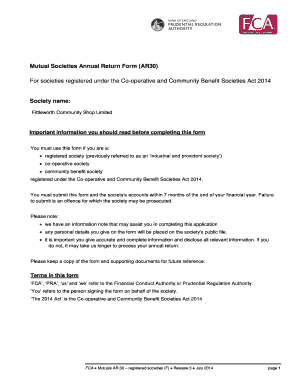
Mutual Societies Annual Return Mutual Societies Annual Return Form (AR30) AR and Provident 1965 For30 societies registered Societies under the Act Cooperative and Community Benefit Societies Act 2014.

How it works
  • Open form

    Open form follow the instructions

  • Easily sign form

    Easily sign the form with your finger

  • Share form

    Send filled & signed form or save

How to fill out the Ar30 Form online

The Ar30 Form is essential for registered societies under the Co-operative and Community Benefit Societies Act 2014 to declare their annual return. Completing this form accurately and promptly ensures compliance with legal requirements and supports effective management of your society.

Follow the steps to fill out the Ar30 Form effectively.

  1. Press the ‘Get Form’ button to access the Ar30 Form and open it in your online editor.
  2. Begin by entering the details of your society, such as the registered number and office address. Make sure to complete each field accurately.
  3. Provide the year-end date in the specified format (dd/mm/yyyy). This information is vital in determining the applicable financial year for your return.
  4. Fill out the committee of management details. Input the names, addresses, and years of birth for the Chairman, Treasurer, Secretary, and other committee members in BLOCK CAPITALS.
  5. Answer any relevant questions about disqualifications or regulations, ensuring all responses are truthful and complete to avoid delays in processing.
  6. Complete the statistics section with accurate financial data, including total income, expenditures, and details about assets and liabilities.
  7. Assess the audit requirement based on your society's rules. Select the appropriate audit type and confirm whether the membership has allowed an exemption for the full audit if applicable.
  8. Complete the accounts and signature section. Ensure that the appropriate individuals sign and date the form. Attach all required documents including the society’s accounts and audit report.
  9. Once filled out, review the form for accuracy, then save your changes. You may choose to download, print, or share the completed form as needed.

Complete the Ar30 Form online to ensure your society meets its annual return obligations.

Get form

Experience a faster way to fill out and sign forms on the web. Access the most extensive library of templates available.

Related content

DA PAM 30-22 Operating Procedures for the Army...

Feb 6, 2007 — Form 3980-R (Dining Facility Account Card) with DA Form 7455 (...

Learn more
DA PAM 30-22 Operating Procedures for the Army...

Feb 6, 2007 — Form 3980-R (Dining Facility Account Card) with DA Form 7455 (...

Learn more
ArmaLite AR-30 - qaz.wiki - QWERTY.WIKI

Den Armalite AR-30 er en bolt-action riffel fremstillet af Armalite . Baseret...

Learn more
Questions & Answers

Get answers to your most pressing questions about US Legal Forms API.

Contact support

How do I submit accounts to FCA?

Via email to Regulatory. Via email (Regulatory.reports@fca.org.uk) or via post or hand delivery to the FCA marked for the attention of 'Central Reporting'. Via email (Regulatory.reports@fca.org.uk) or via post or hand delivery to the FCA marked for the attention of 'Central Reporting'.

Via email to Regulatory. Via email (Regulatory.reports@fca.org.uk) or via post or hand delivery to the FCA marked for the attention of 'Central Reporting'.

How to apply. You'll need to apply to FCA and meet the conditions for your type of business. Read more about preparing for authorisation if you're applying to offer consumer credit. The authorisation fee you pay depends on how complex your application is to process.

An Annual Return must be completed by all societies registered under the Co-operative and Community Benefit Societies Act 2014 ('the Act') (including any societies previously registered under the Industrial and Provident Societies Act 1965).

It is a legal requirement to send the annual return (AR30) and accounts to us within 7 months of the end of your financial year. You can submit this through the Mutuals Society Portal, or by downloading the form (.fca.org.uk/firms/mutual-societies- forms).

To report a scam or an unauthorised firm, contact us via phone or via our contact form. We're open Monday to Friday, 8am to 6pm and Saturday 9am to 1pm. Our team will take details of the scam and give you guidance on your next steps. Calls using next generation text relay, please call us on (18001) 0207 066 1000.

Get This Form Now!

Use professional pre-built templates to fill in and sign documents online faster. Get access to thousands of forms.

If you believe that this page should be taken down, please follow our DMCA take down process here.

Get Ar30 Form