Loading
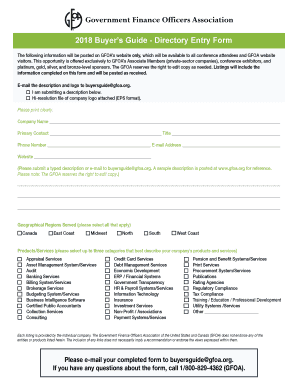
Get 2018 Buyers Guide - Directory Entry Form
How it works
-

Open form follow the instructions
-

Easily sign the form with your finger
-

Send filled & signed form or save
How to fill out the 2018 Buyers Guide - Directory Entry Form online
This guide provides a step-by-step approach to filling out the 2018 Buyers Guide - Directory Entry Form online. It aims to assist users in accurately completing the form and ensuring all necessary information is included for successful submission.
Follow the steps to complete the directory entry form online.
- Press the ‘Get Form’ button to access the directory entry form and open it in the online editor.
- Begin filling out the form by clearly entering the company name in the designated field.
- Next, provide the primary contact's full name and their title to establish a point of communication.
- Include the contact phone number and email address for efficient outreach regarding the entry.
- Type the company's website address for users to easily find additional information.
- In the description section, provide a typed overview of services or products offered by the company. For further convenience, you can also email the description to buyersguide@gfoa.org.
- Select all relevant geographical regions served by your company to enhance visibility among potential clients.
- Choose up to three categories from the provided list that best describe your company’s products and services to ensure accurate representation.
- If applicable, attach a high-resolution company logo in EPS format, ensuring it meets the submission guidelines.
- When the form is fully completed, email the final version to buyersguide@gfoa.org to submit your entry.
- After submission, you may choose to download, print, or share the filled-out form for your records.
Start completing the 2018 Buyers Guide - Directory Entry Form online today.
Point that out, and be clear and direct. This is not the time to beat around the bush. It might even have a declination box where you can sign that you reject the product offered. Remember, you can get most dealer add-ons for hundreds of dollars less elsewhere.