Loading
Get Non Work Related Injury Form
How it works
-

Open form follow the instructions
-

Easily sign the form with your finger
-

Send filled & signed form or save
How to fill out the Non Work Related Injury Form online
Filling out the Non Work Related Injury Form online is a crucial step in documenting any non-work related injuries that may require medical attention. This guide provides a clear, step-by-step approach to ensure that you complete the form accurately and efficiently.
Follow the steps to successfully complete the form.
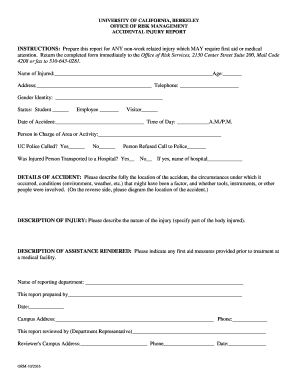
- Press the ‘Get Form’ button to access the Non Work Related Injury Form and open it in your preferred editor.
- Begin by entering the name of the injured person in the designated field labeled 'Name of Injured,' followed by their age in the adjacent space.
- Fill out the address of the injured individual and provide a contact telephone number in the respective fields.
- Indicate the gender identity of the injured person in the provided section.
- Select the status of the injured individual by checking the appropriate box: Student, Employee, or Visitor.
- Document the 'Date of Accident' and 'Time of Day' when the injury occurred.
- Identify the person in charge of the area or activity where the accident took place by writing their name in the provided field.
- Indicate whether the UC Police were called by selecting 'Yes' or 'No.' Additionally, note if the person refused a call to the police.
- Specify if the injured person was transported to a hospital and, if applicable, provide the name of the hospital.
- In the 'Details of Accident' section, describe the accident thoroughly, including the location, circumstances, and any relevant conditions.
- In the 'Description of Injury' field, provide details about the nature of the injury and specify which part of the body was injured.
- Document any assistance rendered prior to treatment at a medical facility in the 'Description of Assistance Rendered' section.
- Complete the report by filling in the name of the reporting department and providing the name of the person preparing the report.
- Fill in the date, campus address, and phone number of the person preparing the report.
- Have the report reviewed by the department representative by filling in their name, campus address, phone number, and date of review.
- Once all fields are completed, save your changes. You may then download, print, or share the completed form as needed.
Complete the Non Work Related Injury Form online today to ensure proper documentation and support.
Get form
Experience a faster way to fill out and sign forms on the web. Access the most extensive library of templates available.
While most work injuries are covered by workers' comp, there are a handful of exceptions. Importantly, workers' compensation is a no-fault system. It doesn't matter if you or your employer's carelessness caused the injury. In general, all that matters is that your injury arose out of your employment.
Get This Form Now!
Use professional pre-built templates to fill in and sign documents online faster. Get access to thousands of forms.