Loading
Get Childcare Liability Waiver
How it works
-

Open form follow the instructions
-

Easily sign the form with your finger
-

Send filled & signed form or save
How to fill out the Childcare Liability Waiver online
This guide provides clear and supportive instructions for filling out the Childcare Liability Waiver online. Understanding each section of the form ensures that you provide the necessary information while acknowledging the associated risks.
Follow the steps to complete the waiver accurately.
- Click ‘Get Form’ button to obtain the document and open it in the editing interface.
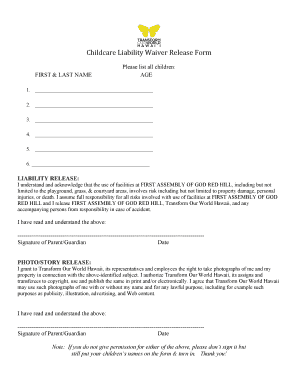
- Start by entering your first and last name in the designated field. This should be the parent or guardian completing the form.
- In the 'Please list all children' section, enter the names of each child participating. Include their ages next to their names for clarity.
- Read the Liability Release carefully. It outlines the associated risks of using facilities at First Assembly of God Red Hill and confirms your understanding and acceptance of these risks.
- Sign and date the Liability Release to confirm your agreement and understanding of the risks involved.
- Next, proceed to the Photo/Story Release section. Review the terms regarding the use of photographs and stories taken by Transform Our World Hawaii.
- If you agree to the Photo/Story Release, sign and date this section as well. If you do not grant permission, leave it unsigned but ensure your children’s names are included on the form.
- Once all necessary fields are filled out and signed, you can save your changes, download, print, or share the completed form as needed.
Complete your Childcare Liability Waiver online today to ensure a smooth process.
The most significant reason to use a liability waiver is that businesses can protect themselves from damages claims and lawsuits associated with inherently risky activities. This level of protection can shield your profitability and company reputation as well as avoid unnecessary legal disputes.