Loading
Get Ced Application Explanation - Center For Educational Documentation
How it works
-

Open form follow the instructions
-

Easily sign the form with your finger
-

Send filled & signed form or save
How to fill out the CED Application Explanation - Center For Educational Documentation online
The CED Application Explanation is an essential document for users seeking evaluations of their educational credentials. This guide provides a clear, step-by-step walkthrough to assist users in completing the application online with confidence.
Follow the steps to fill out your application accurately.
- Use the 'Get Form' button to access the application form online and open it for editing.
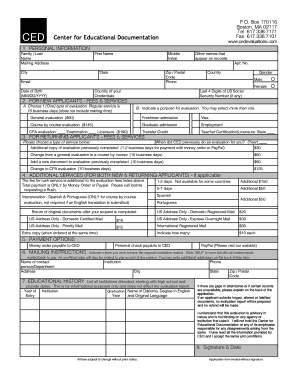
- In the personal information section, enter your last name, current first name, middle initial, mailing address, phone number, email, date of birth, and other requested details. If you've had name changes, provide supporting documents for verification.
- For new applicants, select one type of evaluation from the available options: General Evaluation, Course by Course Evaluation, or CPA Evaluation. Acknowledge the associated fees and processing times.
- Indicate the purpose of the evaluation; you may select multiple purposes such as visa, employment, or admission.
- If you are a returning applicant, specify when CED last evaluated your credentials and select the desired service type for your current request.
- Consider any additional services you may need, including rush service options. Note that these come with extra fees which must be accounted for.
- In the payment options section, choose your preferred payment method and ensure you understand any additional conditions regarding fees.
- Provide mailing instructions by indicating the name, address, and other relevant contact information where you would like your evaluation mailed. If multiple copies are needed, annotate additional addresses on the back of the form.
- Document your educational history by listing all institutions attended, along with dates of entry and graduation. This section should be informational and comply with the guidelines listed.
- Review the advisory statement carefully, sign and date the application to confirm your understanding and acceptance of the terms. This step is crucial as applications without a signature will be deemed invalid.
- Save your changes, and then follow the prompts to download, print, or share the completed form as necessary.
Complete your CED application online today to ensure your educational credentials are evaluated effectively.
EVALUATION TYPES - General Evaluation - $90 – gives the US equivalency of the education reflected in the documents received and an overall grade average can be included.