Loading
Get Gusd Community Service Time Sheet
How it works
-

Open form follow the instructions
-

Easily sign the form with your finger
-

Send filled & signed form or save
How to fill out the GUSD Community Service Time Sheet online
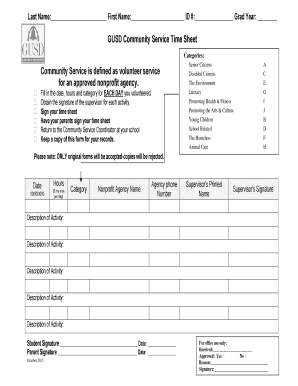
Filling out the GUSD Community Service Time Sheet is an important step for documenting your volunteer activities. This guide provides a clear and supportive overview to help users complete the form accurately and efficiently.
Follow the steps to accurately complete the time sheet.
- Click ‘Get Form’ button to access the time sheet and open it in the designated editor.
- Begin filling out the first section with your last name, first name, ID number, and graduation year. This ensures that your information is correctly associated with your community service hours.
- In the main section, note down the date of each day you volunteered. Make sure to fill this out clearly, as it is crucial for tracking your service.
- Next, indicate the hours you volunteered for each date. Remember, the maximum is 8 hours per day. Accurately recording this information is vital for proper acknowledgment of your efforts.
- Select the category of community service you participated in, choosing from options like senior citizens, the environment, or animal care. This helps to classify your volunteering efforts.
- Provide the name and phone number of the nonprofit agency where you performed your service. This information is essential for verification.
- Obtain the printed name and signature of the supervisor from the nonprofit agency for each activity. This step is required to validate your record.
- In the description field, summarize the activities you carried out during your service. Be descriptive to provide a clear overview of your contributions.
- Once all sections are completed, sign your time sheet and have your parent or guardian sign it as well. Both signatures are necessary for the submission to be valid.
- After securing all signatures, return the completed time sheet to the Community Service Coordinator at your school. Make sure to keep a copy for your personal records.
- Before finalizing your submission, ensure that the form is completed correctly and that you have recognized the note about only original forms being accepted.
Start filling out your GUSD Community Service Time Sheet online today to ensure your volunteer hours are recognized!
Tracking volunteer hours for free One is to use an online spreadsheet, such as Google Sheets or Excel, to track volunteer hours. This can be a great way to track basic information such as hours worked, but it may not be as efficient or comprehensive as a dedicated tracking app.
Industry-leading security and compliance
US Legal Forms protects your data by complying with industry-specific security standards.
-
In businnes since 199725+ years providing professional legal documents.
-
Accredited businessGuarantees that a business meets BBB accreditation standards in the US and Canada.
-
Secured by BraintreeValidated Level 1 PCI DSS compliant payment gateway that accepts most major credit and debit card brands from across the globe.