Loading
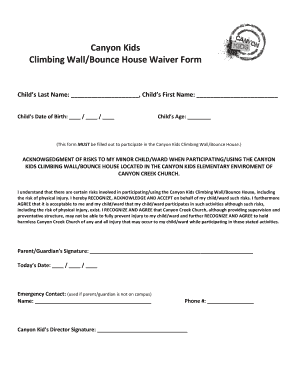
Get Bounce House Waiver Form
How it works
-

Open form follow the instructions
-

Easily sign the form with your finger
-

Send filled & signed form or save
How to fill out the Bounce House Waiver Form online
Completing the Bounce House Waiver Form online is essential for allowing your child to participate in activities at Canyon Creek Church. This guide will assist you in accurately filling out the form, ensuring a smooth process for you and your child.
Follow the steps to successfully complete the waiver form.
- Press the ‘Get Form’ button to access the waiver form and open it in your preferred editor.
- Fill in your child’s last name in the designated field, followed by their first name in the corresponding space.
- Enter your child’s date of birth by selecting the day, month, and year from the provided fields.
- Specify your child’s age in the indicated section to provide additional context for the waiver.
- Read the acknowledgment of risks carefully. This section outlines the potential risks involved with participating in activities at the Canyon Kids Climbing Wall/Bounce House.
- Explicitly state your recognition and acceptance of these risks by providing your signature in the designated area, followed by today's date.
- Should it be necessary, supply an emergency contact name and phone number in the specified fields.
- Finally, ensure the Canyon Kid’s Director signature section is filled out, if applicable. Review all entries for accuracy.
- Once you have completed the form, save your changes, and choose to download, print, or share the completed document as needed.
Encourage others to complete the necessary forms online for a streamlined experience.
All other agency permits must be obtained before we can grant your street activity permit Examples include: Rides and inflatables, such as truck mounted rides and bounce houses require a DOB Inspection Certificate and insurance.