Loading
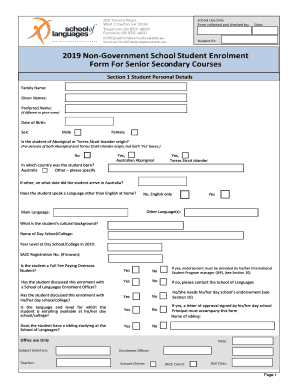
Get 2019 Non-government School Student Enrolment
How it works
-

Open form follow the instructions
-

Easily sign the form with your finger
-

Send filled & signed form or save
How to fill out the 2019 Non-Government School Student Enrolment online
This guide provides a comprehensive overview of how to accurately complete the 2019 Non-Government School Student Enrolment form for online submission. Intended for users of all experience levels, this resource will assist you in navigating each section of the form with clarity and ease.
Follow the steps to complete your enrolment form online:
- Press the ‘Get Form’ button to access the enrolment form and open it in your chosen document editor.
- Section 1: Enter the student's personal details, including family name, given names, and preferred name if applicable. Fill in their date of birth and select their sex from the provided options.
- Indicate whether the student identifies as Aboriginal or Torres Strait Islander. Select ‘Yes’ for both if applicable, and specify the country of birth.
- Provide information about the student's language proficiency, including their primary language spoken at home and cultural background.
- Detail the name of the current day school or college the student attends, their year level in 2019, and, if known, their SACE registration number.
- Indicate whether the student is a Full Fee Paying Overseas student and if they have discussed their enrolment with a School of Languages Enrollment Officer, including any endorsements required from their day school.
- In Section 2, provide the contact details of Parent 1/Guardian 1, including relationship to the student, work phone number, mobile phone, and email address.
- Repeat the previous step for Parent 2/Guardian 2, ensuring all contact information is correctly filled out.
- Complete Section 3 with the mailing and residential address of the parent or guardian listed as the primary contact. Include any necessary details for overseas contacts if applicable.
- In Section 4, enter the emergency contact details if the parent or guardian cannot be reached.
- Section 5 requires you to indicate any active court orders regarding the student and whether the student is under Guardianship. Attach any relevant documents.
- Section 6 focuses on medical conditions. Specify if the student has any diagnosed medical conditions and attach a health care plan if necessary.
- In Section 7, answer whether the student has a diagnosed learning difficulty. If yes, provide details and attach any relevant educational plans.
- Section 8 pertains to course details. Fill in the language for which the student is enrolling, the teaching center, and the course specifics, and ensure to check for eligibility forms if required.
- Section 9 asks about previous language studies; indicate if the student has studied the language before along with relevant details.
- Complete Section 10 by providing endorsements from the student’s day school regarding their enrolment.
- In Section 11, select between Column A or B for the subject charge and complete the relevant declarations.
- Finally, review Section 12 for agreements and consents. Indicate your permissions regarding cyber-safety, health care plans, and media use, as necessary.
- Once all sections are completed and reviewed, users can save changes, download, print, or share the completed form online.
Submit your completed 2019 Non-Government School Student Enrolment form online today!
Regardless of research, the opinion that private school is better than public school still prevails. In fact, data published by the National Association of Independent Schools (NAIS) and Gallup show that private school graduates have better long-term outcomes.
Industry-leading security and compliance
US Legal Forms protects your data by complying with industry-specific security standards.
-
In businnes since 199725+ years providing professional legal documents.
-
Accredited businessGuarantees that a business meets BBB accreditation standards in the US and Canada.
-
Secured by BraintreeValidated Level 1 PCI DSS compliant payment gateway that accepts most major credit and debit card brands from across the globe.