Loading
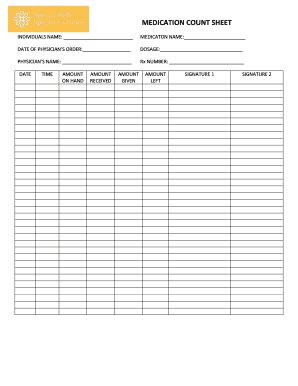
Get Medicaton Name:
How it works
-

Open form follow the instructions
-

Easily sign the form with your finger
-

Send filled & signed form or save
How to fill out the medication name: online
Filling out the medication name form accurately is essential for effective digital document management. This guide provides clear and accessible instructions to help you complete the form online with ease.
Follow the steps to fill out the medication name form online
- Click the ‘Get Form’ button to obtain the medication name form and open it in the editor.
- Enter the individual's name in the designated field labeled 'INDIVIDUALS NAME'. Ensure that the spelling is accurate to avoid any discrepancies in records.
- Fill in the 'MEDICATON NAME' field with the specific name of the medication being documented. Pay attention to the correct spelling and capitalization.
- Input the 'DATE OF PHYSICIAN’S ORDER' by selecting the appropriate date from the date picker. This date should correspond to when the physician prescribed the medication.
- In the 'DOSAGE' section, specify the amount of medication prescribed. Be precise with measurements to ensure clarity.
- Enter the physician's name in the 'PHYSICIAN’S NAME' field, reflecting the name of the healthcare professional who issued the prescription.
- Fill in the 'Rx NUMBER', which is the unique prescription number assigned to the medication. This is important for tracking and verification purposes.
- Document the relevant dates and times when the medication is administered, along with quantities for 'AMOUNT ON HAND', 'AMOUNT RECEIVED', 'AMOUNT GIVEN', and 'AMOUNT LEFT'. This tracking is vital for inventory control.
- Obtain necessary signatures in the 'SIGNATURE 1' and 'SIGNATURE 2' fields to verify the accuracy of the records and the administration of the medication.
- Once all fields are filled out accurately, you can save changes, download a copy of the form, print it for records, or share it as needed.
Begin completing your documents online today for a streamlined process.
This may include identifying its shape or color or inputting the pill identifier by code (sometimes called an imprint). The best way to do this is to start by typing in the imprint code. Then, select the color and shape that best match the pill you have in front of you.