Loading
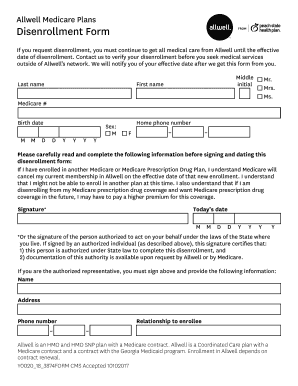
Get Disenrollment Form - Allwell.pshpgeorgia.com
How it works
-

Open form follow the instructions
-

Easily sign the form with your finger
-

Send filled & signed form or save
How to fill out the Disenrollment Form - Allwell.pshpgeorgia.com online
This guide provides clear instructions on how to complete the Disenrollment Form for Allwell online. Following these steps will help ensure that your disenrollment is processed smoothly.
Follow the steps to complete your disenrollment form online.
- Press the ‘Get Form’ button to acquire the disenrollment form and open it in a suitable editor.
- Fill out the required personal information. Start with your last name, middle initial, and first name. Next, enter your Medicare number, date of birth, and sex.
- Provide your home phone number for contact purposes. Ensure that all details are accurate and complete.
- Read the statements regarding disenrollment carefully. If you are enrolled in another Medicare or prescription drug plan, ensure you understand how this affects your current membership.
- Sign and date the form where indicated. If someone is signing on your behalf, ensure they provide their name, address, relationship to you, and phone number.
- Carefully check any boxes that apply to certify your eligibility for disenrollment, as specified in the form.
- Complete any additional information requested regarding qualifying events for disenrollment, if applicable.
- After ensuring all sections are filled correctly, save your changes. You can then download, print, or share the completed form as necessary.
Begin your disenrollment process online by filling out the form today.
§ 460.164 Involuntary disenrollment. A participant may be involuntarily disenrolled for any of the following reasons: (1) The participant, after a 30-day grace period, fails to pay or make satisfactory arrangements to pay any premium due the PACE organization.