Loading
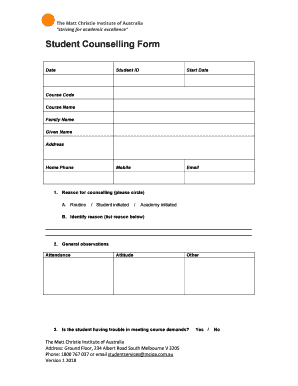
Get Counselling Form
How it works
-

Open form follow the instructions
-

Easily sign the form with your finger
-

Send filled & signed form or save
How to fill out the Counselling Form online
Filling out the Counselling Form online can seem daunting at first, but with this guide, you will understand each section and field thoroughly. By following the step-by-step instructions, you can ensure a smooth and efficient process.
Follow the steps to successfully complete your Counselling Form online.
- Click ‘Get Form’ button to obtain the form and open it in your preferred digital format.
- Begin by entering the date in the designated field. This helps establish when the counselling request is being made.
- Next, provide your student ID. This unique identifier will assist in tracking your counselling requests.
- Enter the start date for the counselling process. This is the date you wish to initiate counselling.
- Fill in your mobile number and email to ensure that you can be contacted regarding your counselling session.
- Input your course code and course name to identify the program you are currently enrolled in.
- Provide your family name and given name in the respective fields to confirm your identity.
- Enter your address for correspondence purposes. This should include your street address, city, and postal code.
- Include your home phone number so that you can be reached easily if needed.
- In the 'Reason for counselling' section, circle your response: whether it is 'Routine', 'Student initiated', or 'Academy initiated'.
- For the specific reason, list any details that are relevant to your counselling request in the provided space.
- In the 'General observations' section, note your attendance, attitude, and any other relevant remarks to give context to your situation.
- Indicate whether you are having trouble meeting course demands by selecting 'Yes' or 'No'.
- If you selected 'Yes', explain the nature of the difficulties you are facing.
- Outline any proposed management plan or corrective measures taken so far in the designated field.
- Specify the date for the next counselling session to help plan ahead.
- In the comments section, provide any additional information or remarks that may be helpful for your counsellor.
- Finally, acknowledge the information provided by including your signature and date. Remember, signing does not indicate agreement but acknowledges understanding.
- Once all fields are completed, save your changes and consider downloading, printing, or sharing the form as needed.
Complete your Counselling Form online today for effective support and guidance.
The therapist will ask questions about your presenting concerns, as well as your history and background. Most likely, you'll find yourself talking about your current symptoms or struggles, as well saying a bit about your relationships, your interests, your strengths, and your goals.