Loading
Get Claim Form - Dentacare
How it works
-

Open form follow the instructions
-

Easily sign the form with your finger
-

Send filled & signed form or save
How to fill out the CLAIM FORM - DentaCare online
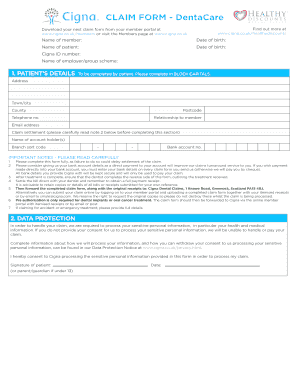
Filing a claim can be a straightforward process with the right guidance. This comprehensive guide will walk you through each section of the CLAIM FORM - DentaCare, ensuring you understand how to complete it accurately online.
Follow the steps to fill out the claim form successfully.
- Press the ‘Get Form’ button to access the CLAIM FORM - DentaCare and open it in the form editor.
- Begin by entering the name of the member in the corresponding field. Make sure to provide accurate information as it is essential for processing your claim.
- Next, input the date of birth of the member. This should match the date on your official identification documents.
- Proceed to enter the name of the patient. If the patient is the same as the member, indicate this accordingly.
- Input the patient's date of birth in the next field, ensuring it is correct.
- Enter the Cigna ID number, which is critical for identifying the member and processing the claim accurately.
- Fill in the name of the employer or group scheme associated with the member's DentaCare plan.
- In the patient’s details section, provide the full address, including town/city, county, and postcode. Ensure you use block capitals for clarity.
- Enter the telephone number and email address of the patient to facilitate communication regarding the claim.
- Indicate the relationship of the patient to the member to complete the necessary context for the claim.
- For the claim settlement, carefully read the notes and fill in the bank account details of the account holder, including the branch sort code and bank account number.
- After completing the form, review all information for accuracy. It is advisable to retain copies of all bills or receipts submitted.
- Submit the completed claim form along with original treatment receipts either by post to Cigna Dental Claims or through online submission.
- After submission, you have the option to save changes, download, print, or share the form for your records.
We encourage you to complete your CLAIM FORM - DentaCare online for a seamless claims experience.
1. Go to Office Manager Reports Ledger Aging Report - set all desired options for this report to see the desired information. 2. Check 'Print to File' to print to a tab-delimited file.