We use cookies to improve security, personalize the user experience, enhance our marketing activities (including cooperating with our marketing partners) and for other business use.
Click "here" to read our Cookie Policy. By clicking "Accept" you agree to the use of cookies. Read less
Read more
Accept
Loading
Form preview
  • US Legal Forms
  • Form Library
  • More Forms
  • More Uncategorized Forms
  • Visit And Short Term Stay Vaf1a Form

Get Visit And Short Term Stay Vaf1a Form

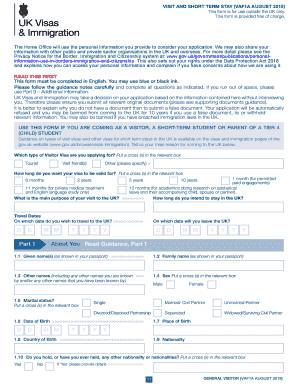
VISIT AND SHORT TERM STAY (VAF1A AUGUST 2018)This form is for use outside the UK only. This form is provided free of charge.The Home Office will use the personal information you provide to consider.

How it works

  1. Open form

    Open form follow the instructions

  2. Easily sign form

    Easily sign the form with your finger

  3. Share form

    Send filled & signed form or save

How to fill out the Visit and Short Term Stay VAF1A Form online

Filling out the Visit and Short Term Stay VAF1A Form online is a crucial step for those who wish to visit the UK for various purposes, including tourism or short-term studies. This guide will walk you through the necessary steps to ensure your application is completed accurately and efficiently.

Follow the steps to complete the VAF1A Form online.

  1. Click the ‘Get Form’ button to access the VAF1A Form and open it in your preferred editor.
  2. Begin with Part 1, which includes personal details such as given name(s), family name, date of birth, and place of birth. Ensure all information mirrors your passport accurately.
  3. Move to Part 2, where you will need to input details from your passport, such as the passport number, issuing authority, and dates of issue and expiry.
  4. In Part 3, provide your contact details, including your residential address, telephone number, and email address.
  5. Proceed to Part 4 to fill in information about your family, including names and nationalities of your parents and details of any spouse or children travelling with you.
  6. Part 5 addresses your finances and employment. Indicate your current employment status, monthly income, and details about your employer if applicable.
  7. In Part 6, answer questions about your travel history and previous applications to the UK and other countries.
  8. For applicants under 18, Part 7 must be filled out by a parent or guardian providing details of accompanying adults and consent for the child's visit.
  9. In Part 8, explain your intended activities in the UK, including where you will stay and if you will visit any relatives or friends.
  10. Use Part 9 for any additional information that may support your application, providing full details as necessary.
  11. Complete Part 10 by making the declaration statement confirming the accuracy of your information and signature.
  12. Finally, gather and attach any supporting documents, ensuring your application is comprehensive before submitting your form.
  13. Once completed, save your changes. You have options to download, print, or share the form as needed.

Take the next step in your journey by filling out the VAF1A Form online today.

Get form

Experience a faster way to fill out and sign forms on the web. Access the most extensive library of templates available.
Get form

Related content

Uk Visit Visa Application Required Documents...
tourist visa are as follows: UK tourist visa application form VAF1A. ... the United...
Learn more

Related links form

Robin R600 Generator Owner's Manual & Assembly Instructions - Arrow Storage Products Carole Hochman Size Chart Tabela De Medidas De Camas

Questions & Answers

Get answers to your most pressing questions about US Legal Forms API.

Contact support

your name & surname. nationality. country of residence. marital status. personal number. passport number. reason for wishing to enter the UK. other information about your application.

To upload your documents, you can either click on the grey banner in order to browse your hard drive, or simply Drag and Drop your files to the banner. ... Click on Done when the upload is completed. Once conversion completed, you are now able to open the document in order to preview it.

Surname (Family Name) Write your name as indicated on your passport (Please do not add the words married name and the name of your husband)! Surname at birth (Former Family Name) ... First Name(s) ... Date of Birth. ... Place of Birth. ... Country of Birth. ... Current Nationality. ... Gender.

Step 1: Go to the link https://iasservices.org.uk/track-uk-visa-status/. Step 2: One will require any one of the following details handy: Case ID or Case Identification Number: This information is available on all the letters that are received from the Home Office. It is an 8-digit number.

In most of the countries last name is more important and in case if you don't have last name you can use your first name as last name. Hi there! Usually you go with what is mentioned in the passport. However, in your case where the surname is not present, you may use your name again in the surname column.

your name & surname. nationality. country of residence. marital status. personal number. passport number. reason for wishing to enter the UK. other information about your application.

You can provide your supporting documents either by: uploading them into the UKVCAS online service. having them scanned at your UKVCAS appointment.

Change or cancel your application If you want to change something in your application after you've sent it contact UK Visas and Immigration ( UKVI ). You can ask to cancel your application. Your fee will only be refunded if UKVI has not started processing your application.

Step 2: Register with VFS Global to book appointment, choose services. After completing the online form and visa fee payment, you will be redirected to register on the VFS Global website to: Upload documents online and/or choose from a range of convenient and optional visa services. ... Step 3: Review and pay.

Get This Form Now!

Use professional pre-built templates to fill in and sign documents online faster. Get access to thousands of forms.
Get form
If you believe that this page should be taken down, please follow our DMCA take down processhere.

Industry-leading security and compliance

US Legal Forms protects your data by complying with industry-specific security standards.
  • In businnes since 1997
    25+ years providing professional legal documents.
  • Accredited business
    Guarantees that a business meets BBB accreditation standards in the US and Canada.
  • Secured by Braintree
    Validated Level 1 PCI DSS compliant payment gateway that accepts most major credit and debit card brands from across the globe.
Get Visit And Short Term Stay Vaf1a Form
Get form
Form Packages
Adoption
Bankruptcy
Contractors
Divorce
Home Sales
Employment
Identity Theft
Incorporation
Landlord Tenant
Living Trust
Name Change
Personal Planning
Small Business
Wills & Estates
Packages A-Z
Form Categories
Affidavits
Bankruptcy
Bill of Sale
Corporate - LLC
Divorce
Employment
Identity Theft
Internet Technology
Landlord Tenant
Living Wills
Name Change
Power of Attorney
Real Estate
Small Estates
Wills
All Forms
Forms A-Z
Form Library
Customer Service
Terms of Service
Privacy Notice
Legal Hub
Content Takedown Policy
Bug Bounty Program
About Us
Help Portal
Legal Resources
Blog
Affiliates
Contact Us
Delete My Account
Site Map
Industries
Forms in Spanish
Localized Forms
State-specific Forms
Forms Kit
Legal Guides
Real Estate Handbook
All Guides
Prepared for You
Notarize
Incorporation services
Our Customers
For Consumers
For Small Business
For Attorneys
Our Sites
US Legal Forms
USLegal
FormsPass
pdfFiller
signNow
airSlate WorkFlow
DocHub
Instapage
Social Media
Call us now toll free:
+1 833 426 79 33
As seen in:
  • USA Today logo picture
  • CBC News logo picture
  • LA Times logo picture
  • The Washington Post logo picture
  • AP logo picture
  • Forbes logo picture
© Copyright 1997-2025
airSlate Legal Forms, Inc.
3720 Flowood Dr, Flowood, Mississippi 39232
Form Packages
Adoption
Bankruptcy
Contractors
Divorce
Home Sales
Employment
Identity Theft
Incorporation
Landlord Tenant
Living Trust
Name Change
Personal Planning
Small Business
Wills & Estates
Packages A-Z
Form Categories
Affidavits
Bankruptcy
Bill of Sale
Corporate - LLC
Divorce
Employment
Identity Theft
Internet Technology
Landlord Tenant
Living Wills
Name Change
Power of Attorney
Real Estate
Small Estates
Wills
All Forms
Forms A-Z
Form Library
Customer Service
Terms of Service
Privacy Notice
Legal Hub
Content Takedown Policy
Bug Bounty Program
About Us
Help Portal
Legal Resources
Blog
Affiliates
Contact Us
Delete My Account
Site Map
Industries
Forms in Spanish
Localized Forms
State-specific Forms
Forms Kit
Legal Guides
Real Estate Handbook
All Guides
Prepared for You
Notarize
Incorporation services
Our Customers
For Consumers
For Small Business
For Attorneys
Our Sites
US Legal Forms
USLegal
FormsPass
pdfFiller
signNow
airSlate WorkFlow
DocHub
Instapage
Social Media
Call us now toll free:
+1 833 426 79 33
As seen in:
  • USA Today logo picture
  • CBC News logo picture
  • LA Times logo picture
  • The Washington Post logo picture
  • AP logo picture
  • Forbes logo picture
© Copyright 1997-2025
airSlate Legal Forms, Inc.
3720 Flowood Dr, Flowood, Mississippi 39232