Loading
Get Cares Ems Agency Account Setup Form
How it works
-

Open form follow the instructions
-

Easily sign the form with your finger
-

Send filled & signed form or save
How to fill out the CARES EMS Agency Account Setup Form online
Completing the CARES EMS Agency Account Setup Form is essential for establishing your unique agency account within the CARES program. This guide will provide clear, step-by-step instructions to assist you in filling out the form correctly and efficiently.
Follow the steps to complete the CARES EMS Agency Account Setup Form.
- Click ‘Get Form’ button to obtain the form and open it in the editor.
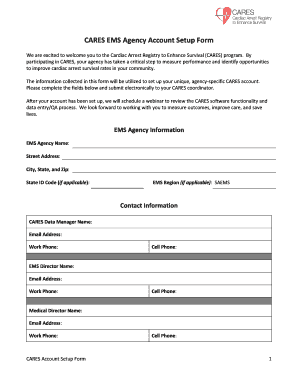
- Begin by entering your EMS agency information in the designated fields. Provide your EMS agency's name, street address, city, state, zip code, and state ID code if applicable.
- Fill in the contact information section by entering the names, email addresses, and phone numbers (both work and cell) for the CARES data manager, EMS director, and medical director.
- Next, describe your geographic coverage area. List all counties where your agency responds, define your geographic catchment area, and indicate the total population within that area.
- In the general information section, input your agency’s average monthly cardiac arrest call volume. Specify if you currently collect Utstein-style metrics and if your cardiac arrest data has been made publicly available.
- Indicate your interest in the supplemental Dispatcher-Assisted CPR module by selecting 'Yes' or 'No'.
- Provide information about your data collection methods. Enter the ePCR vendor name and product version, and describe the ability of your software to query cardiac arrest events.
- List all first responders that operate in your EMS agency’s response area by entering the names and state ID codes of each relevant department.
- Finally, list all hospitals that receive cardiac arrest patients from your agency. For each hospital, provide the name, state ID code if applicable, and contact details including the CARES contact name, email address, work phone, and cell phone.
- After completing all sections of the form, review your entries for accuracy. Once you are satisfied with the information, save your changes, and choose to download, print, or share the form as necessary.
Take the next step and complete your CARES EMS Agency Account Setup Form online today!
CARES stands for the Cardiac Arrest Registry to Enhance Survival. CARES is a collaborative effort of the Centers for Disease Control and Prevention (CDC), the American Heart Association (AHA) and the Emory University Department of Emergency Medicine.
Industry-leading security and compliance
US Legal Forms protects your data by complying with industry-specific security standards.
-
In businnes since 199725+ years providing professional legal documents.
-
Accredited businessGuarantees that a business meets BBB accreditation standards in the US and Canada.
-
Secured by BraintreeValidated Level 1 PCI DSS compliant payment gateway that accepts most major credit and debit card brands from across the globe.