Loading
Get Sliate Ac Lk
How it works
-

Open form follow the instructions
-

Easily sign the form with your finger
-

Send filled & signed form or save
How to fill out the Sliate Ac Lk online
Filling out the Sliate Ac Lk form is an essential step in the bid submission process for procurement. This guide provides clear, step-by-step instructions to help users navigate the online completion of the form efficiently.
Follow the steps to complete your bid submission form online.
- Click ‘Get Form’ button to obtain the form and open it in the editor.
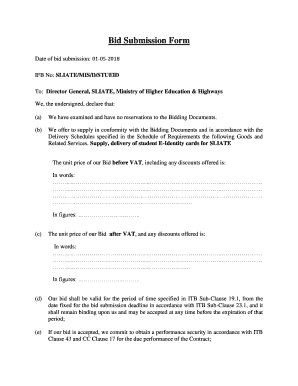
- Enter the date of bid submission in the designated field. Use the format of day-month-year for clarity, for example, 01-05-2018.
- Fill in the IFB No field with the appropriate identifier, which is SLIATE/MIS/D/STUEID.
- Address the form to the Director General, SLIATE, Ministry of Higher Education & Highways.
- In Section (a), confirm that you have examined the Bidding Documents and have no reservations. This is typically done by checking a box or entering a confirmation statement.
- For Section (b), provide a detailed description of the goods and services you are offering, specifically noting the supply and delivery of student E-Identity cards for SLIATE.
- Indicate the unit price of your bid before VAT. Write this in both words and figures in the provided fields.
- In Section (c), present the unit price of your bid after VAT, also in both words and figures.
- In Section (d), confirm the validity of your bid for the specified period. This indicates your commitment to hold the bid price until the specified deadline.
- Section (e) involves a commitment to obtain performance security should your bid be accepted.
- In Section (f), confirm that there is no conflict of interest as per the guidelines outlined in ITB Sub-Clause 4.3.
- Section (g) requires you to declare that neither your firm, nor its affiliates, has been blacklisted by the National Procurement Agency.
- In Section (k), understand that your bid, along with the acceptance notification from the authority, will form a binding contract.
- Also, recognize in Section (l) that acceptance of the bid is not guaranteed, regardless of the evaluation.
- Finally, sign the document in the indicated space, and enter the name of the person signing the bid, their National ID No, and designation.
- Complete the name and address of the organization in the respective fields, ensuring accuracy.
- Once all fields are completed, ensure to save any changes made, and download, print, or share the completed form as required.
Complete your documents online to ensure a smooth and efficient bid submission process.
Sri Lanka Institute of Advanced Technoligical Education (SLIATE)
Industry-leading security and compliance
US Legal Forms protects your data by complying with industry-specific security standards.
-
In businnes since 199725+ years providing professional legal documents.
-
Accredited businessGuarantees that a business meets BBB accreditation standards in the US and Canada.
-
Secured by BraintreeValidated Level 1 PCI DSS compliant payment gateway that accepts most major credit and debit card brands from across the globe.