Loading
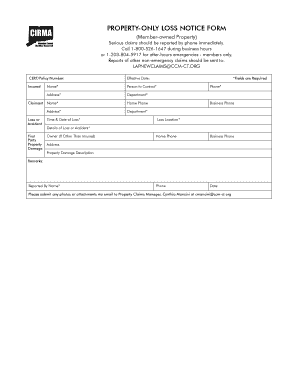
Get Property-only Loss Notice Form - Cirma.ccm-ct.org
How it works
-

Open form follow the instructions
-

Easily sign the form with your finger
-

Send filled & signed form or save
How to fill out the PROPERTY-ONLY LOSS NOTICE FORM - Cirma.ccm-ct.org online
This guide provides clear instructions on how to fill out the PROPERTY-ONLY LOSS NOTICE FORM efficiently. By following these steps, you will ensure that your submission is complete and accurate, allowing for a smoother claims process.
Follow the steps to correctly complete the form.
- Click ‘Get Form’ button to access the form and open it in your online editor.
- Begin by entering the CERT/Policy Number in the designated field. This information is crucial for processing your claim.
- Fill in the Effective Date of your insurance coverage to establish the timeline for your claim.
- Complete the Insured Name field, providing the full name of the insured party to ensure correct identification.
- In the Person to Contact section, provide the name of the individual who will handle the claim communication.
- Enter the Address where the insured is located. This should be the primary address associated with the insurance policy.
- Specify the Department applicable to the claim if necessary, which helps in categorizing the loss.
- Complete the Claimant Name and Address fields to identify the individual filing the claim.
- In the Loss or Accident section, indicate the Time & Date of Loss to provide important context for the claim.
- If applicable, fill in the Owner of the property if it is different from the insured party.
- Provide your Phone number and, if necessary, your Home Phone and Business Phone to facilitate communication.
- Enter the Loss Location, specifying where the loss or accident occurred.
- In the Details of Loss or Accident section, describe the incident and any relevant information that will assist in the evaluation of the claim.
- Add any additional remarks that could aid the claims process.
- Complete the Reported By Name field with your name or the name of the individual submitting the report.
- Once all fields are completed thoroughly, you can save changes, download, print, or share the form as needed.
Start your document submission today by filling out the PROPERTY-ONLY LOSS NOTICE FORM online.
Related links form
Industry-leading security and compliance
US Legal Forms protects your data by complying with industry-specific security standards.
-
In businnes since 199725+ years providing professional legal documents.
-
Accredited businessGuarantees that a business meets BBB accreditation standards in the US and Canada.
-
Secured by BraintreeValidated Level 1 PCI DSS compliant payment gateway that accepts most major credit and debit card brands from across the globe.