Loading
Get Asmt 10 Format
How it works
-

Open form follow the instructions
-

Easily sign the form with your finger
-

Send filled & signed form or save
How to fill out the Asmt 10 Format online
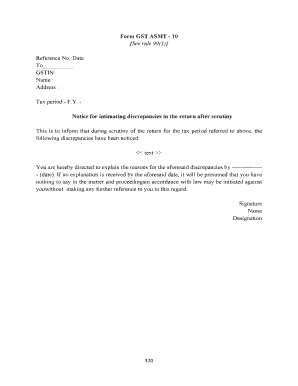
The Asmt 10 Format is a crucial document used to communicate discrepancies identified during the scrutiny of tax returns. This guide provides clear, step-by-step instructions on how to complete this form online, ensuring that you can address any discrepancies effectively.
Follow the steps to fill out the Asmt 10 Format properly
- Press the ‘Get Form’ button to access the Asmt 10 Format and open it in an online editor.
- Fill in the 'Reference No.' field with the appropriate reference number related to the discrepancy.
- Enter the current date in the 'Date' field to indicate when you are completing the form.
- In the 'To' field, specify the recipient of the notice regarding the discrepancies.
- Provide the GSTIN (Goods and Services Tax Identification Number) in the respective field, ensuring accuracy.
- Type the name of the individual or entity to whom the notice is addressed in the 'Name' field.
- Input the address of the recipient in the 'Address' section; ensure it is complete to facilitate proper communication.
- Indicate the tax period (financial year) relevant to the discrepancies in the specified field.
- In the designated area for discrepancies, clearly outline the discrepancies noticed during the scrutiny of the return. Provide any relevant details.
- State a deadline for the recipient to respond to the discrepancies by filling in the date provided for explanations.
- Complete the form by adding your signature, name, and designation at the bottom of the form.
- After reviewing the form for accuracy, save your changes, and proceed to download or print the form as needed.
Complete your documents securely and easily online.
“Section 61. (1) The proper officer may scrutinize the return and related particulars furnished by the registered person to verify the correctness of the return and inform him of the discrepancies noticed, if any, in such manner as may be prescribed and seek his explanation thereto.