Loading
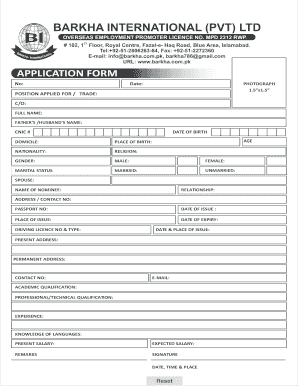
Get Barkha International Pvt Ltd
How it works
-

Open form follow the instructions
-

Easily sign the form with your finger
-

Send filled & signed form or save
How to fill out the Barkha International Pvt Ltd online
Filling out the Barkha International Pvt Ltd application form can be a straightforward process when you understand the steps involved. This guide provides clear instructions to help you successfully complete the form online.
Follow the steps to fill out the Barkha International Pvt Ltd application form
- Click ‘Get Form’ button to obtain the form and open it in the editor.
- Begin by entering the date of your application in the designated field.
- Input your personal identification number (No) in the appropriate section.
- Attach a recent passport-sized photograph (1.5”x1.5”). Ensure the dimensions are correct.
- Indicate the position you are applying for by writing the specific trade or job title.
- C/O: Enter the name of the individual to whom your application should be addressed, if applicable.
- Enter your full name as it appears on your identification documents.
- Provide your father's or partner's name in the specified field.
- Input your CNIC (Computerized National Identity Card) number.
- Fill in your date of birth accurately.
- Specify your age based on the date you provided.
- Indicate your domicile by entering the relevant information.
- State your place of birth clearly.
- Write your nationality.
- Indicate your religion in the appropriate section.
- Select your gender by marking the appropriate option (Male or Female).
- Indicate your marital status by selecting either Married or Unmarried.
- If applicable, provide your spouse's name.
- Enter the name of your nominee.
- Specify your nominee's relationship to you.
- Provide your contact address and phone number.
- Input your passport number.
- Fill in the date of issue of your passport.
- Indicate the place where your passport was issued.
- Enter the date of expiry of your passport.
- Input your driving license number and type.
- Describe the date and place of issue of your driving license.
- Provide your present and permanent address.
- Fill in any additional contact numbers.
- Enter your email address.
- List your academic qualifications, including the names of institutions and degrees obtained.
- Detail your professional or technical qualifications.
- Provide information regarding your work experience.
- Indicate your knowledge of languages.
- State your present salary.
- Indicate the salary you expect.
- Use the remarks section for any additional information you wish to provide.
- Ensure that you sign and date your application. Include the place of signing.
- Review all entries for accuracy, and make any necessary edits.
- After completing the form, save your changes, download, print, or share the form as needed.
Take the first step towards your career by filling out the application form online today.