Loading
Get Critical Incident Report Form - Bpa Health
How it works
-

Open form follow the instructions
-

Easily sign the form with your finger
-

Send filled & signed form or save
How to fill out the Critical Incident Report Form - BPA Health online
Filling out the Critical Incident Report Form - BPA Health is a crucial process for documenting events that threaten the safe and efficient operation of a provider or contractor. This guide will walk you through the steps to ensure you complete the form correctly and efficiently.
Follow the steps to complete the Critical Incident Report Form online.
- Click ‘Get Form’ button to obtain the critical incident report form and open it in your browser.
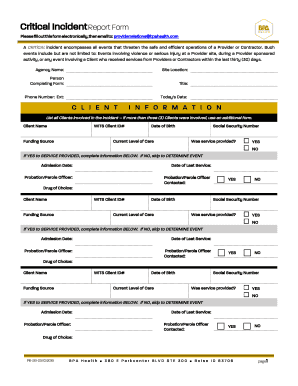
- Fill in the agency name and site location at the top of the form to identify the reporting provider.
- Provide your information as the person completing the form, including your title, phone number, and extension, ensuring your contact details are accurate.
- Enter today's date to record when the incident report is being completed.
- In the 'Client Information' section, list all clients involved in the incident. If more than three clients were involved, use an additional form.
- For each client listed, fill out their name, WITS client ID, funding source, date of birth, current level of care, and social security number.
- Indicate whether a service was provided to the client by checking 'Yes' or 'No.' If 'Yes,' complete additional fields regarding admission date, date of last service, and probation/parole officer information.
- Next, move to the 'Determine Event' section. Depending on the nature of the incident (death or other), follow the specific instructions provided.
- If the incident involves death, complete the type of death, date of death, date notified, notification method, and a description of the death.
- If the incident is other than death, check all applicable events (e.g., violent behavior, overdose) and provide detailed descriptions, including time and location of the event.
- In the 'Clients Involved' section, list all involved clients again, indicating their role as participant or witness, whether they were injured, and if they required medical attention.
- Do the same under 'Staff Involved,' documenting each staff member present during the incident.
- In the 'Response/Actions Taken' section, describe immediate actions taken by staff before, during, and after the incident, including measures to address safety risks and prevent recurrence.
- Finally, provide the print name, position, and signature of the person filling out the form along with their telephone number and date to finalize the report.
- Once you have completed all sections, save the changes to the form, and you may choose to download, print, or share the completed report via email as instructed.
Ensure you complete the Critical Incident Report Form online to maintain accurate records and support organizational safety.
Related links form
What Is a Critical Incident? Some examples of critical incidents include assaults on employees, hostage-takings, the suicide or murder of a co- worker, accidents causing bodily harm or death, as well as airplane crashes or natural disasters including floods, fires and tornadoes.
Industry-leading security and compliance
US Legal Forms protects your data by complying with industry-specific security standards.
-
In businnes since 199725+ years providing professional legal documents.
-
Accredited businessGuarantees that a business meets BBB accreditation standards in the US and Canada.
-
Secured by BraintreeValidated Level 1 PCI DSS compliant payment gateway that accepts most major credit and debit card brands from across the globe.