Loading
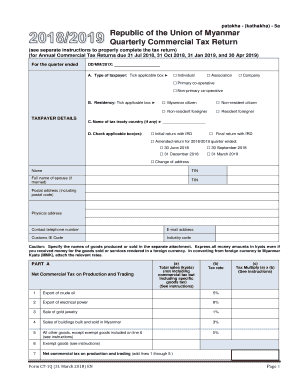
Get Quarterly Commercial Tax Return Form
How it works
-

Open form follow the instructions
-

Easily sign the form with your finger
-

Send filled & signed form or save
How to fill out the Quarterly Commercial Tax Return Form online
Filling out the Quarterly Commercial Tax Return Form accurately is essential for compliance with tax regulations. This guide provides step-by-step instructions to help users navigate the form effectively, ensuring a smooth online filing process.
Follow the steps to complete your tax return form online.
- Click ‘Get Form’ button to obtain the Quarterly Commercial Tax Return Form and open it in the editor.
- In section A, identify your type of taxpayer by ticking the applicable box. This includes options like individual, company, or various cooperative types.
- For residency status in section B, tick the correct box that represents your situation, such as Myanmar citizen or non-resident foreigner.
- Fill out the taxpayer details, including your name, Tax Identification Number (TIN), contact information, and industry code.
- In section C, indicate if there is a tax treaty country applicable to your tax situation.
- In section D, select the relevant boxes for your return type: initial, final, amended, or change of address.
- In Part A, enter the total sales amounts for production and trading without including commercial tax, and input the applicable tax rate for each category.
- Calculate the net commercial tax on sales by multiplying the total sales by the applicable tax rate.
- In Part B, complete details for domestic services rendered, following the same pattern as Part A for entries and calculations.
- Part C summarizes your net commercial tax due or overpaid. Add the totals from Parts A and B, then account for any payments made or credits applicable.
- If applicable, complete the declarations for a paid preparer and taxpayer or representative, ensuring all signatures are provided as required.
- Finally, review all entered information for accuracy and completeness, then save changes, download, print, or share the form as needed.
Complete your Quarterly Commercial Tax Return Form online today to ensure compliance and avoid penalties.
Purpose of Form Use Form 720 and attachments to report your liability by IRS No. and pay the excise taxes listed on the form. If you report a liability on Part I or Part II, you may be eligible to use Schedule C to claim a credit.