Loading
Form preview
  • US Legal Forms
  • Other Templates
  • More Forms
  • More Uncategorized Forms
  • International Money Transfer Form

Get International Money Transfer Form

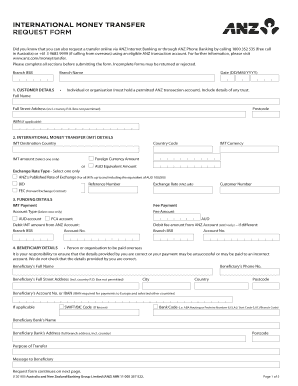
INTERNATIONAL MONEY TRANSFER REQUEST FORM Did you know that you can also request a transfer online via ANZ Internet Banking or through ANZ Phone Banking by calling 1800 352 535 (free call in Australia).

How it works

  1. Open form

    Open form follow the instructions

  2. Easily sign form

    Easily sign the form with your finger

  3. Share form

    Send filled & signed form or save

How to fill out the International Money Transfer Form online

Filling out the International Money Transfer Form online is a straightforward process designed to assist users in transferring funds internationally. This guide will provide step-by-step instructions to ensure that you complete the form accurately and efficiently.

Follow the steps to successfully complete the International Money Transfer Form.

  1. Click the ‘Get Form’ button to obtain the form and open it in the online editor.
  2. Enter the branch name and BSB (Bank-State-Branch) code to identify your banking branch.
  3. Provide the date in the format DD/MM/YYYY to document when the request is made.
  4. Fill in customer details, including whether you are an individual or an organisation. Make sure to provide your full name, street address (including the country), postcode, and ABN if applicable.
  5. For international money transfer details, input the country code, destination country, transfer amount, and select the currency type. Choose between foreign currency amount or AUD equivalent amount.
  6. Select the exchange rate type based on your transaction details. Options include ANZ's published rate of exchange or BID. Include your reference number and customer number as necessary.
  7. Complete funding details by indicating the payment method for the IMT and any associated fees. Specify the account type and amounts to be debited from your ANZ account.
  8. Input beneficiary details, including their account number and full name. Ensure the beneficiary's street address, city, country, postcode, and any relevant codes (like SWIFT or BIC) are accurate.
  9. If transferring to China in Chinese Yuan, complete the additional required fields related to the beneficiary's Chinese Identification Card number, and select the source of funds.
  10. Read and accept the agreement and authorisation terms by signing in the relevant fields. Ensure you acknowledge the privacy terms by providing any necessary consent.
  11. After completing the form, review all entered details for accuracy. You may now save changes, download, print, or share the form as needed.

Take the first step and complete your International Money Transfer Form online today!

Get form

Experience a faster way to fill out and sign forms on the web. Access the most extensive library of templates available.
Get form

Related content

International Fund Transfers...
Aug 14, 2013 — international wire transfers, international ACH transactions, and...
Learn more
WIRE TRANSFER FORM - INTERNATIONAL
WIRE TRANSFER FORM - INTERNATIONAL. (payee bank account outside US). Instructions: 1...
Learn more
Gini coefficient - Wikipedia
In economics, the Gini coefficient sometimes called the Gini index or Gini ratio, is a...
Learn more

Related links form

Japanese Verb Conjguation Practice Sheet How To Make Te-form Gro Hiragana & Katakana Kanji Radicals

Questions & Answers

Get answers to your most pressing questions about US Legal Forms API.

Contact support

To make a SWIFT transfer, you will need: The full name of the person or company you wish to pay. The full name and branch address of the destination bank. The Bank Identifier Code (BIC) or SWIFT code, plus the account number (or IBAN for European accounts) to which you are transferring funds.

Six-digit sort code of the account you're paying. Eight-digit account number of the account you're paying. A payment reference (often your name or customer number) to let them know the money came from you. Sometimes you'll need the name and address of the bank you're sending the money to.

In short, yes: in a wire transfer, the sender's bank acts as an intermediary, sending information about the transfer to the receiver's bank before the money is moved, whereas a bank transfer simply involves sending money directly from one bank account to another.

What is Needed for an International Wire Transfer? The recipient's full name and address. The amount of the wire transfer. Name and address of the recipient's bank. Recipient's bank account number and account type. Recipient's bank routing number. Recipient bank's SWIFT or BIC code (when applicable) Reason for the transfer.

Your bank statement should have your IBAN number, which you may need to submit in order to send or receive money internationally. This number is sometimes used along with your SWIFT code, which also helps international banks identify one another and their accounts.

When sending an international bank wire, you will need to provide the recipient's name, address, banks SWIFT BIC, and bank account number, plus the International Payments System Routing Code, for certain countries (you will be prompted for this).

Method #1: Making an International Wire Transfer Online Through the Bank Find the wire transfer page. ... Check your online transfer limit. ... Provide bank details. ... Enter the amount and currency type. ... Pay the processing fee. ... Find out how long it will take to arrive. ... Bring all banking data to the branch with you.

Get This Form Now!

Use professional pre-built templates to fill in and sign documents online faster. Get access to thousands of forms.
Get form
If you believe that this page should be taken down, please follow our DMCA take down processhere.
Get International Money Transfer Form
Get form
  • Adoption
  • Bankruptcy
  • Contractors
  • Divorce
  • Home Sales
  • Employment
  • Identity Theft
  • Incorporation
  • Landlord Tenant
  • Living Trust
  • Name Change
  • Personal Planning
  • Small Business
  • Wills & Estates
  • Packages A-Z
  • Affidavits
  • Bankruptcy
  • Bill of Sale
  • Corporate - LLC
  • Divorce
  • Employment
  • Identity Theft
  • Internet Technology
  • Landlord Tenant
  • Living Wills
  • Name Change
  • Power of Attorney
  • Real Estate
  • Small Estates
  • Wills
  • All Forms
  • Forms A-Z
  • Other Templates
  • Legal Hub
  • About Us
  • Help Portal
  • Legal Resources
  • Blog
  • Affiliates
  • Contact Us
  • Delete My Account
  • Site Map
  • Industries
  • Forms in Spanish
  • Localized Forms
  • State-specific Forms
  • Forms Kit
  • Real Estate Handbook
  • All Guides
  • Notarize
  • Incorporation services
  • For Consumers
  • For Small Business
  • For Attorneys
  • USLegal
  • FormsPass
  • pdfFiller
  • signNow
  • altaFlow
  • DocHub
  • Instapage
Form Packages
  • Adoption
  • Bankruptcy
  • Contractors
  • Divorce
  • Home Sales
  • Employment
  • Identity Theft
  • Incorporation
  • Landlord Tenant
  • Living Trust
  • Name Change
  • Personal Planning
  • Small Business
  • Wills & Estates
  • Packages A-Z
Form Categories
  • Affidavits
  • Bankruptcy
  • Bill of Sale
  • Corporate - LLC
  • Divorce
  • Employment
  • Identity Theft
  • Internet Technology
  • Landlord Tenant
  • Living Wills
  • Name Change
  • Power of Attorney
  • Real Estate
  • Small Estates
  • Wills
  • All Forms
  • Forms A-Z
  • Other Templates
Customer Service
  • Legal Hub
  • About Us
  • Help Portal
  • Legal Resources
  • Blog
  • Affiliates
  • Contact Us
  • Delete My Account
  • Site Map
  • Industries
  • Forms in Spanish
  • Localized Forms
  • State-specific Forms
  • Forms Kit
Legal Guides
  • Real Estate Handbook
  • All Guides
Prepared for you
  • Notarize
  • Incorporation services
Our Customers
  • For Consumers
  • For Small Business
  • For Attorneys
Our Sites
  • USLegal
  • FormsPass
  • pdfFiller
  • signNow
  • altaFlow
  • DocHub
  • Instapage
Social Media
Call us now toll free:
+1 833 426 79 33
As seen in:
© Copyright 1999-2026 airSlate Legal Forms, Inc. 17 Station Street, Suite 303, Brookline, MA 02445
  • Your Privacy Choices
  • Terms of Service
  • Privacy Notice
  • Content Takedown Policy
  • Bug Bounty Program